
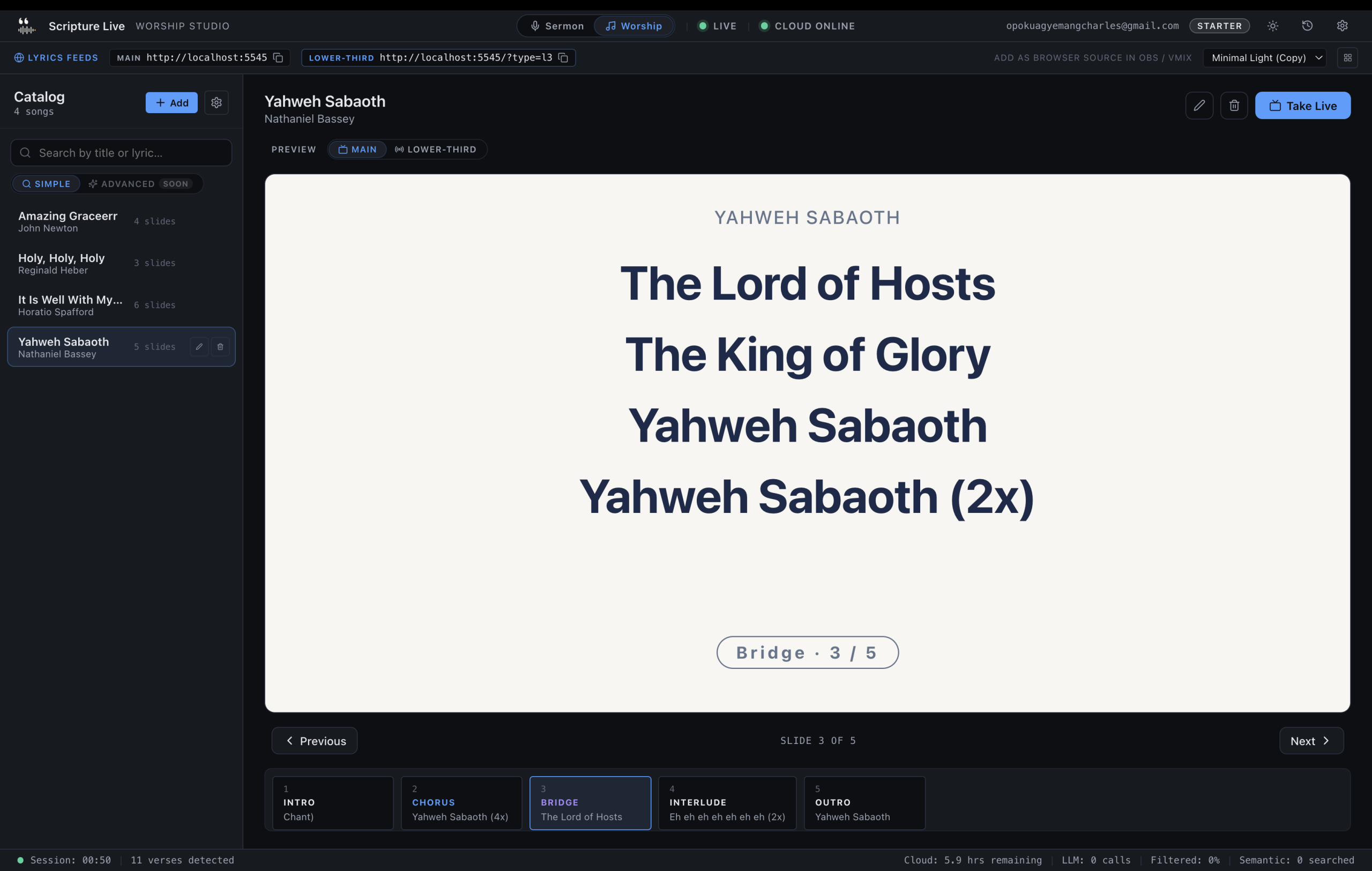
Worship lyrics remote: control your church projector from a tablet on stage
TL;DR
– Pair a tablet with the operator booth; advance lyrics from anywhere on the platform.
– One-tap song selection, slide navigation, and theme switching — no laptop visible from the crowd.
– Three remote pairings on the Team tier; unlimited on Church tier.
There’s a specific moment in the third song of a worship set where the band makes a call. The keys player drops the volume, the worship leader catches the room, decides on the fly — bridge again, or land the song. The decision is made in a half-second of eye contact between the leader and the band. And then the worship leader has to turn their head, find the tech operator at the back of the sanctuary, and somehow communicate “we’re going back to the bridge” without breaking the flow they just spent forty-five minutes building. This is the problem a worship lyrics remote solves.
If you’ve run worship more than three times, you’ve felt this. Hand signals across forty feet of sanctuary. A volunteer operator who knows the song well enough to probably guess right but not always. A pre-service rehearsal that maps every transition perfectly until the Spirit moves and the leader changes the plan in real time. The mismatch between on-stage flexibility and back-of-room execution is the single biggest source of worship-set friction we hear about, and it’s a problem with a clean solution: the worship leader controls the projector themselves, from a tablet, on stage.
The flow-breaking problem
Some specific examples we’ve collected from worship leaders we work with:
- “I held the bridge for an extra repeat because the room was leaning in. The operator didn’t know, advanced the slide, congregation lost the thread for the next eight bars.”
- “We added ‘How Great Thou Art’ to the set order on Saturday night because it fit the sermon. Operator didn’t get the memo, song wasn’t loaded, we covered with a piano interlude until they could find it.”
- “I called an audible from ‘Goodness of God’ to ‘Reckless Love’ between verses. Twelve seconds of hand-waving while the operator searched.”
These aren’t operator-skill problems. They’re communication-architecture problems. The information (“what slide should be on screen right now“) originates with the worship leader, but the control surface (the booth laptop) is forty feet away. Every solution that doesn’t directly address that gap is patching around it: better hand signals, in-ear comms (which the band leader can’t always wear), pre-printed set sheets that go stale the moment the plan changes.
The clean answer is: put the control in the same place as the information. Tablet on the stage, leader controls lyrics directly, operator at the back becomes a backup rather than a bottleneck.
What if the worship leader just controlled the projector themselves
That’s what Scripture Live’s Network Remote Operator does. It’s a feature on every paid tier (1 remote on Starter, 3 on Team, unlimited on Church). The setup is small enough to walk through start to finish in this article.
The model: the main Scripture Live app runs on the booth laptop, exactly as it does today. A worship leader on stage opens a web browser on a tablet or phone — Safari on iPad, Chrome on a Pixel, anything that loads a webpage. They navigate to a local URL, enter a 6-digit PIN, and a near-complete clone of the lyrics workspace appears on the tablet. Searching, queueing, displaying, advancing slides — all of it works from the tablet, and every action is reflected on the in-room projector instantly.
The “instantly” part matters. This isn’t internet-routed. The tablet and the booth laptop are on the same Wi-Fi network. A tap on the tablet sends a packet across the local network and the projector updates within ~50ms — fast enough that the worship leader doesn’t perceive lag. There’s no cloud round-trip, no frontier-model reasoning, no server in another country. It’s LAN-local. (Which, incidentally, means the remote works fine in a sanctuary basement with no internet — a useful property for venues where Wi-Fi is reliable but the broader internet isn’t.)
The pairing flow, walked through
End-to-end. Five minutes the first time, fifteen seconds every Sunday after.
On the booth laptop (Scripture Live):
- Open
Settings→Network Remote Operator. - Toggle
Enable remote operators. - Set the bind host. The default is
0.0.0.0(listen on all network interfaces). If your Wi-Fi is public or shared with a guest network, set it to your specific LAN IP instead. - Note the URL Scripture Live displays — something like
http://192.168.1.42:5547. - Click
Generate pairing PIN. A 6-digit code appears, valid for 10 minutes.
On the worship leader’s tablet:
- Confirm the tablet is on the same Wi-Fi network as the booth laptop. (If your church has separate “guest” and “staff” Wi-Fi, both devices need to be on the same one.)
- Open Safari / Chrome.
- Navigate to the URL from step 4 above.
- Enter the 6-digit PIN.
- The lyrics workspace loads. The leader is paired.
On every Sunday after:
The pairing persists for the device. The leader opens the tablet, taps the bookmarked URL, and is back in the workspace. The PIN flow only repeats if the pairing is revoked or if the device hasn’t connected in 30 days.
What the leader can do from the tablet
Functionally, the tablet is a near-clone of the operator’s lyrics workspace. The worship leader can:
- Search the song library by title or first line.
- Queue a song. Songs in the queue display in order; the leader advances slide-by-slide.
- Display a song instantly. Tap → on screen.
- Advance, go back, hold a slide. Verse, chorus, bridge, verse 2, chorus, chorus again, bridge, end.
- Hide the screen. “Black out” between songs or during prayer.
- Switch between songs in the set. No need to advance through a song to get to the next one.
- Edit lyrics on the fly. If the leader spots a typo mid-set, fix it from the tablet. (Edits sync back to the booth library after the service.)
What the tablet can’t do (deliberately):
- Configure system settings.
- Edit themes or change fonts.
- Modify the OBS browser-source feeds.
- Display Custom Slides (operator’s responsibility, not the leader’s).
The split is intentional. The tablet is the performance surface; the booth laptop remains the configuration surface. The leader doesn’t accidentally change the theme by tapping the wrong icon.
Real-world setup: who carries the tablet
The worship leader is the obvious primary, but the remote works for several other roles:
- Worship leader, on a 9.7″ iPad mounted on the keyboard or on a small mic-stand clip. The leader glances at it between phrases.
- Band leader / music director, on a phone or tablet at the band MD’s station. The MD calls audibles, controls the slides, the worship leader stays focused on singing.
- A second tech operator on the floor, walking around, troubleshooting in real time. The booth operator stays with the laptop; the floor operator moves.
- The pastor’s mic-checker / stage manager, for transitions between worship and sermon — pre-loading the pastor’s first scripture reference so the screen is ready when the sermon starts.
The tier limits exist for a reason. On Starter (1 remote) only one of these roles is paired at a time. On Team (3 remotes) you can pair the worship leader, the band leader, and the floor operator simultaneously and they all see the same shared queue. On Church (unlimited) we’ve seen larger production teams pair seven or eight remotes across worship, lyrics, lower-thirds, and announcement coordination.
A note on hardware. Don’t buy a fancy tablet for this. A used iPad Mini or a sub-GHS-1500 Android tablet handles the workspace fine. The browser is the application; the device is just the chrome.
Failure modes and recovery
The thing nobody tells you about live tech is that recovery matters more than uptime. Things will break occasionally. The question is how fast you’re back.
Wi-Fi drops. The tablet loses connection mid-set. The booth laptop keeps running — the operator can step in. The tablet reconnects when Wi-Fi returns; no re-pairing needed.
PIN expired before pairing. The operator generates a new one. PINs expire on a 10-minute window specifically to limit the risk of someone watching the screen and guessing.
Tablet battery dies. Pre-service ritual: plug the tablet in twenty minutes before the service starts. Treat it like the band’s in-ears — a known-quantity charge.
Wrong device pairs. Revoke the pairing from the booth laptop’s Settings → Network Remote Operator → Active devices. The tablet is kicked out instantly.
Tablet shows a stale screen. Pull-to-refresh in the browser. The workspace re-syncs from the booth laptop.
The most common failure we see is the booth laptop and the tablet ending up on different Wi-Fi networks (church guest network versus staff network). The fix is the network — both devices on the same SSID. If the church has multiple WiFi access points, ensure they bridge to the same LAN; ask your IT person if you’re not sure.
Pairing the remote with detection
For paid-tier churches running both lyrics-from-the-stage and live scripture detection, the workflow during a service looks like this:
- Worship set. Worship leader controls lyrics from the tablet. Booth operator monitors but doesn’t intervene unless something goes wrong.
- Sermon transition. Worship leader queues the pastor’s first verse on the tablet. Booth operator confirms detection is enabled.
- Sermon. Pastor speaks; detection runs in the background; verses appear on screen automatically. Booth operator reviews any queued (Reasoning Layer) detections and approves them. The full mechanics are in the live detection deep-dive.
- Closing. Worship leader resumes control for the closing song.
The combination — worship leader controls lyrics, automatic detection handles scripture, operator approves the ambiguous cases — is roughly the most evolved booth workflow we’ve seen in church tech. The booth operator’s job becomes “monitor and intervene”, which is a much better fit for volunteer staffing than “type fast for ninety minutes.”
If you’re also routing the projector to a livestream, the OBS browser-source workflow we covered in the OBS scripture and lyrics streaming guide plays nicely with all of the above. Lyrics from the tablet show up on the in-room projector and on the YouTube stream simultaneously.
FAQ
Does the remote work over the internet? No, by design. The remote is LAN-only — both devices have to be on the same Wi-Fi network. We made this choice for latency (LAN-local actions reflect instantly) and for security (no exposing the booth laptop to the public internet). If you need remote-over-internet, a VPN bridges the two networks.
Can multiple people control at once? Yes, on paid tiers with multiple remote slots. All paired devices share the same queue and same display state — if the band leader displays slide A and the worship leader advances to slide B, the projector goes to B. We’ve found this works smoothly in practice because there’s usually one designated controller per song.
Does the tablet need to be Apple? Android? Windows? Any modern browser works. iPad Safari, Pixel Chrome, a Samsung tablet, even a cheap Amazon Fire tablet (with the third-party Chrome install). The remote is a webpage, not an app.
What happens if the booth laptop crashes mid-service? The remote loses connection and shows a “reconnecting” indicator. When the laptop comes back up, the remote auto-reconnects. The recovery is faster than re-establishing eye contact with the back of the room.
Is there a setup-free version of this? No. Pairing a 6-digit PIN once is the minimum security floor. We’re not willing to ship a configuration where any device on the network can grab control of the projector — that’s how guest-Wi-Fi pranks happen.
The Network Remote Operator is the feature that quietly changes how a worship set feels — once the leader has the control surface in their hand, the back-of-room hand signals stop being part of the workflow. If your church has been running worship with hand signals for years, the free trial of a paid tier on scripturelive.app is the right way to see whether your team would actually use it. Most leaders tell us they wouldn’t go back.
Related reading
Try Scripture Live
Free Offline Mode includes the KJV and Twi Bibles, reference and phrase search, custom slides, and the OBS browser-source feed — install on as many machines as you want, no account needed.
📥 Download: scripturelive.app
💵 Pricing: scripturelive.app/pricing












Leave a Reply