
Church AV setup on a budget: a streaming-ready projection system from GHS 3,000
TL;DR
– GHS 25,000-35,000 builds a streaming-ready church AV booth from scratch.
– One mini-PC, one camera, one HDMI capture card, projector, audio mixer, lights.
– Software stack: Scripture Live (free or GHS 200/mo) + OBS (free) — no per-seat licenses.
Walk into ten small Ghanaian churches on a Sunday morning and you’ll see ten variations of the same problem: a pile of mismatched gear, half-working, that nobody quite knows how to operate, that cost more in aggregate than a coordinated build would have. A church AV setup on a budget isn’t actually about minimum spend — it’s about minimum waste. The right GHS 3,000 build outperforms a chaotic GHS 8,000 collection of gear nobody planned. This article is the practical shopping guide we wish existed when we started talking to small-church tech leads in 2024.
Two builds. The first is minimum-viable — what you actually need to run a Sunday service with scripture on screen and a half-decent livestream, for around GHS 3,000. The second is comfortable — what you build when you’ve got the small one running and you’re ready to upgrade specific pain points, for around GHS 15,000. Real prices, real brand names where useful, and an honest take on what to skimp on (cameras, lights) versus what not to (microphone, audio interface).
We’ll be specific about Scripture Live’s role because that’s the software side of the build, but most of this guide is about hardware. The software stack at every tier is some combination of Scripture Live (free Offline Mode or a paid tier) and OBS (free, always). That stack is genuinely sufficient. You don’t need to buy ProPresenter, vMix, Wirecast, or any of the expensive boxes. The combined free-and-open software covers nearly everything most churches under 500 seats actually need.
The “small budget, big ambition” reality
Before we list gear, the failure mode this guide is preventing.
Most small churches end up with mismatched AV gear because the gear was acquired piecemeal — a borrowed projector from a member, a USB mic that came with a podcast kit, a laptop someone donated, a video capture device bought on impulse for a special service. Nothing was specced together. Nothing was budgeted as a system. The result is a Sunday-morning pre-service ritual where the worship leader, the tech volunteer, and the pastor all huddle around the booth at 9:15 AM trying to figure out why the audio isn’t routing into OBS today.
The fix is: budget the system, not the gear. Even at GHS 3,000, picking compatible pieces beats spending GHS 8,000 on whatever was on sale. The numbers below are 2026 prices in Accra; they’ll be roughly right elsewhere in West Africa with currency adjustment. Outside the region, swap brand names and the structure still holds.
Build 1 — Minimum-viable, around GHS 3,000
A church AV stack that does scripture-on-screen and a basic livestream. Not pretty. Functional.
| Item | Spec | Approx. price (GHS) |
|---|---|---|
| Projector | Used, 3,000+ lumens, HDMI input (Epson EB-X05 or similar) | 1,200 |
| Computer | Used Mac Mini (2018+) or Windows mini-PC with 8GB RAM, SSD | 800 |
| USB microphone | Cardioid dynamic, USB plug-and-play (Shure MV7+, used) | 600 |
| HDMI cable + screen mount | 10m HDMI, ceiling mount or shelf | 200 |
| Software | Scripture Live (Offline Mode, free) + OBS (free) | 0 |
| Wi-Fi router | Existing church Wi-Fi (assume free) | 0 |
| Total | 2,800 |
Reasonable buffer for cables, adapters, and the inevitable thing-that-broke: GHS 200. Total: GHS 3,000.
What this build does:
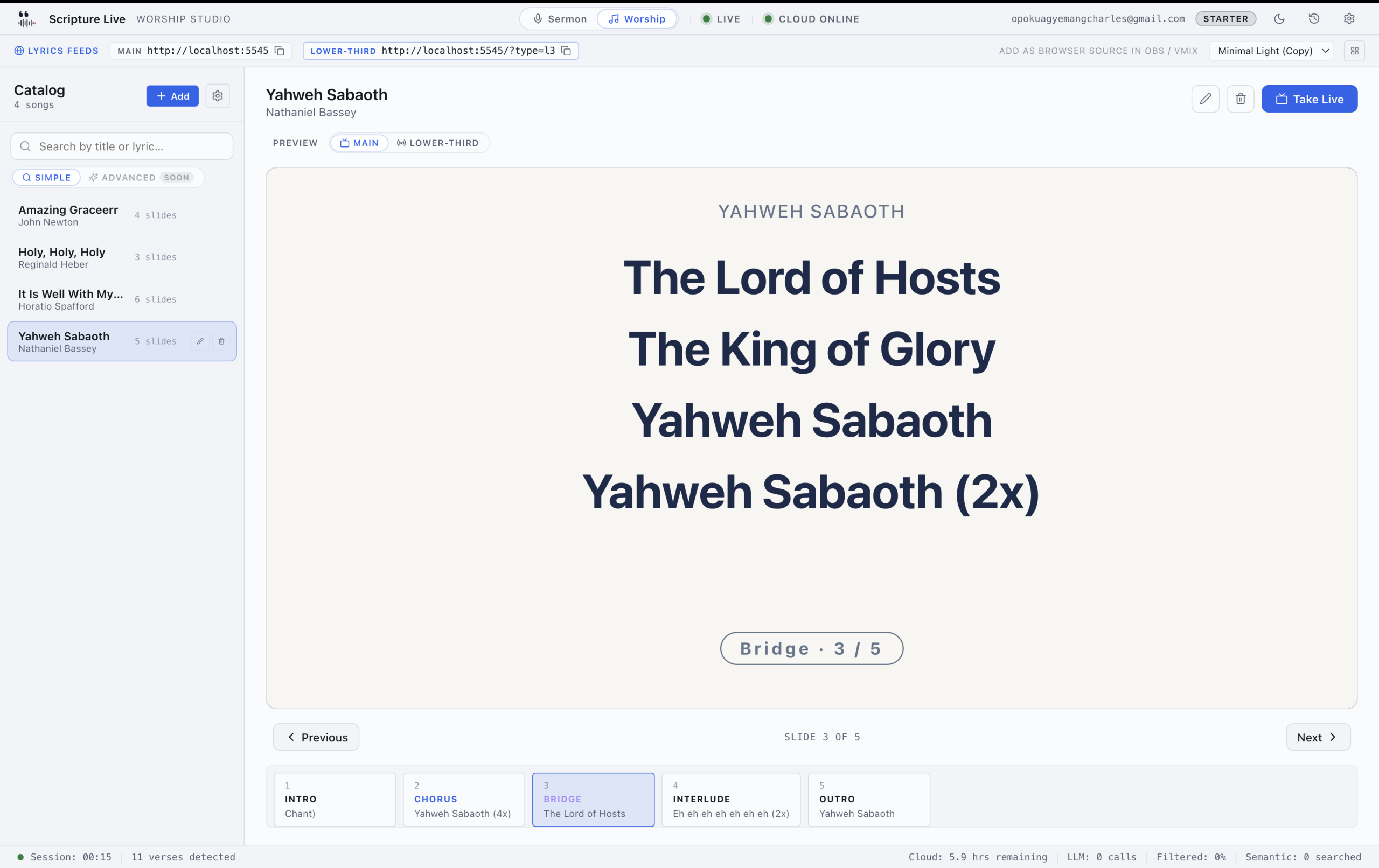
- Projects scripture and worship lyrics on the in-room screen via Scripture Live’s free Offline Mode
- Records a basic livestream via OBS, fed by the USB mic and the laptop’s webcam (for now)
- Streams to YouTube Live or Facebook Live
- Handles up to ~150 seats comfortably
What this build doesn’t do:
- No live scripture detection (Offline Mode includes reference search and phrase search, but not the spoken-audio detection — that’s on paid tiers)
- No multi-camera switching (one camera, locked off, suffices to start)
- No professional audio routing — the USB mic is the only audio source
- No dedicated streaming computer; the same laptop runs Scripture Live and OBS
The minimum-viable build is honest about its limits. It produces a service that’s better than no projection at all, with a livestream that’s watchable rather than polished. For a 100-seat church starting out, that’s exactly the right starting point.
Key software notes. Offline Mode ships KJV and Twi Bibles in the free installer — no internet required to operate. The offline-mode article covers what’s included. OBS is the streaming layer; it’s free, it works on Mac and Windows, and it has a browser-source input that consumes Scripture Live’s two output URLs (scripture and lyrics) directly.
Build 2 — Comfortable, around GHS 15,000
The “we’ve been running for a year, let’s upgrade the pain points” build.
| Item | Spec | Approx. price (GHS) |
|---|---|---|
| Projector | New, 4,000+ lumens, 1080p, HDMI (Epson EB-FH06 or similar) | 4,500 |
| Computer | New mini-PC or M-series Mac Mini, 16GB RAM, SSD | 4,000 |
| Condenser mic | Pulpit/lectern condenser (Shure SM81 or AKG C214) | 1,800 |
| Audio interface | Focusrite Scarlett 2i2 or Behringer UMC22 (for phantom power) | 800 |
| XLR cable + boom arm | 10m XLR, podcast-grade boom or pulpit clip | 300 |
| HDMI cable + ceiling mount | 15m HDMI, professional ceiling mount | 500 |
| Tripod camera | Logitech C920 or used DSLR with USB capture | 1,500 |
| USB capture device | Elgato Cam Link or generic HDMI-to-USB | 400 |
| Scripture Live Starter | GHS 200/mo subscription — includes detection | 200 (first month) |
| OBS, scenes, presets | Free | 0 |
| Buffer for cables, adapters | 700 | |
| Total | 14,700 |
What this build adds over the minimum:
- Live scripture detection during sermons — the central paid feature. Pastor speaks; verses appear on screen automatically. The live detection article covers what this looks like in practice.
- Real audio. A pulpit condenser mic with phantom power, routed through an audio interface, is the difference between “barely audible YouTube stream” and “this sounds professional”. This is the single biggest perceived-quality upgrade in the entire build.
- Tripod camera with USB capture. One reliable wide shot beats four flaky cameras.
- Brighter projector. 4,000 lumens is the threshold where the screen reads cleanly in a half-lit sanctuary; below that, you’re forcing the lights down to compensate.
Tier choice. GHS 200/mo Starter (1 machine, 6 cloud detection hours, KJV + TWI + NIV) covers most small churches with one weekly service. Churches with multiple services or multiple campuses bump up to Team (GHS 400/mo, 3 machines, 18 hours pooled, all 13 translations). The free vs paid article walks through which tier matches which service shape.
The “we have streaming” upgrade path
If your church is already running a livestream and you want to upgrade the streaming side specifically, the additions on top of Build 2 are:
- Second computer dedicated to OBS / streaming (GHS 4,000+). Separates encoding workload from Scripture Live’s detection workload — fewer dropped frames during sermon.
- Hardware video switcher (Blackmagic ATEM Mini or similar, GHS 2,500+) for multi-camera setups. Stop trying to switch cameras inside OBS — a hardware switcher is faster and more reliable.
- Professional audio mixer (Behringer X-Air or Mackie ProFX, GHS 2,000+) if you have a worship band. The 2-channel interface from Build 2 doesn’t scale past one or two mics.
- Dedicated stream upload — at minimum a 10 Mbps committed upload, ideally a fiber line independent of the church’s general Wi-Fi.
For step-by-step on the streaming side, the projector setup for live streaming guide is the companion article. Worth reading before you spend on streaming gear specifically.
What NOT to skimp on
Every “save money on AV” article gets this section wrong. Here’s the one that actually matters:
1. Microphone. Bad audio kills detection accuracy and kills livestream listenability. A used condenser mic at GHS 1,500 outperforms three GHS 500 USB mics. If you’re going to spend extra somewhere, spend it here.
2. Audio interface (if using XLR mics). A Focusrite Scarlett or comparable interface gives you clean phantom power, low noise floor, and reliable USB compatibility. Don’t try to save GHS 300 on a Behringer-of-questionable-origin from a market stall — the failure mode is that one Sunday morning the interface won’t enumerate over USB and you’re broadcast-down.
3. HDMI cable. Bad HDMI cable causes flicker and dropouts. Spend the GHS 200 on a known-good cable rather than the GHS 50 cable that fails after three months. If your run is over 15 meters, use a powered HDMI extender, not a longer passive cable.
4. Power conditioning. Ghana’s grid has surges. A UPS / power conditioner for the booth equipment (GHS 400-800) prevents one bad Sunday from destroying GHS 10,000 worth of computers. This isn’t on either of the build lists above because it’s optional, but it’s the optional thing that pays off the most.
What you can wait on
Equally important: the things that look essential and aren’t.
1. Multiple cameras. One reliable wide shot is better than three flaky cameras. Many small churches plan for four cameras and end up with two of them disconnected by mid-service. Start with one. Add a second in year two.
2. Stage lighting. Existing house lights are usually fine for a starter livestream. Stage lighting upgrades are the third or fourth thing to budget, not the first.
3. Professional projection screen. A good wall, painted matte white, projects almost as well as a screen at zero cost. Buy the screen later.
4. Wireless lavalier mics for the worship band. Wired mics work. Wireless adds reliability problems (battery management, RF interference) that small AV teams don’t have the bandwidth to manage.
5. Streaming-specific encoders. OBS on a reasonable laptop handles 1080p30 livestreaming fine. You don’t need a dedicated encoder appliance until you’re streaming multi-camera 1080p60 or 4K — which is way down the priority list.
Software stack: what you don’t need to buy
Most “church AV budget” guides assume you’re going to spend GHS 1,500-3,000 on projection software (ProPresenter or similar). For most small-to-mid churches in 2026, you don’t need to. The combined free-and-open stack covers nearly everything:
- Scripture Live Offline Mode (free) for projection: KJV + Twi Bibles, reference search, phrase search, custom slides for offering and announcements, projector window, OBS browser-source feed.
- OBS Studio (free) for streaming: scene composition, browser-source consumption of Scripture Live’s feeds, multi-camera switching at the software level, RTMP push to YouTube / Facebook / Vimeo.
- VLC (free) for the rare case where you need to play a video file as a standalone source.
The paid software step is Scripture Live’s Starter or Team tier — GHS 200-400/mo — when you specifically want live scripture detection during sermons. That’s a real upgrade, but it’s also the only paid software step most churches will need to make.
Compare this to a stack of ProPresenter ($14/mo, ~GHS 200) + Wirecast or vMix ($30+/mo, ~GHS 450) + a Bible plugin (varies). You’re at GHS 700+/mo before any detection capability, and you still don’t have live scripture detection from sermon audio because none of those tools ship it.
Setup labor estimate
Real numbers for what it takes to actually install:
- Build 1 (minimum-viable): a Saturday afternoon. 4-5 hours for one experienced volunteer or two beginners. Mounting the projector is the slowest step. Software install is 30 minutes; OBS scene configuration is another 30; mic setup is 15 minutes.
- Build 2 (comfortable): a full day, ideally split across a Saturday and a Sunday afternoon for testing. Cable runs (XLR, HDMI) are the slowest. Audio interface configuration adds 30-60 minutes if it’s your first time. OBS scene presets for sermon / worship / announcement add another hour.
If you’re paying a contractor, expect GHS 1,500-3,000 for installation labor on Build 2. You can save it by doing it yourself — the work isn’t difficult, just methodical.
A real-world starting sequence
If you’re a small church starting from zero, the order we’d recommend:
- Month 1. Buy Build 1. Get the projector mounted, scripture on screen, basic livestream up. Run it for four Sundays. Find the failure modes.
- Month 2-3. Identify the single biggest pain point. Usually it’s audio (USB mic too quiet, room noise) or detection (operator can’t keep up with pastor). Upgrade just that one thing.
- Month 4-6. Add the audio interface and condenser mic. Start the Scripture Live Starter subscription. Now you have detection and broadcast-grade audio.
- Month 7+. Add the second camera. Add the streaming-specific computer. By this point you’re at the comfortable build, and the upgrades have been earned by service experience rather than guessed at upfront.
The biggest mistake we see is churches spending GHS 15,000 in month 1 on gear that sits half-configured for a year. Start small. Earn each upgrade.
FAQ
Can I run Scripture Live on a Chromebook? No — Scripture Live is a desktop app, Mac / Windows / Linux. A used Mac Mini or a Windows mini-PC at GHS 800-1,500 is the right cost-effective starting point.
What about an iPad as the projection computer? Not as the primary. iPad can be a Network Remote Operator (a worship leader’s stage tablet) on a paid tier, but the main app needs a real desktop OS for the OBS routing and the local feed servers.
Do I need internet for Build 1? Only for the livestream side. Scripture Live’s Offline Mode runs entirely without internet — projection, custom slides, reference search, all local. If your livestream needs go through, you need internet for that, but the in-room projection works whether you have internet or not.
What’s the cheapest projector that’s actually usable? 3,000 lumens minimum. Below that, you’ll spend the saved money on blackout curtains. Used Epson, BenQ, or Optoma units at the GHS 1,000-1,500 range work fine.
Should I buy or build the booth furniture? Build it, ideally. A flat plywood platform with cable cutouts at the back, mounted at standing-desk height, costs GHS 200-400 and outperforms a “professional” rack. The booth is functional infrastructure, not show furniture.
The clear answer to “how much does a streaming-ready church AV setup cost in 2026?” is somewhere between GHS 3,000 and GHS 15,000, depending on whether you’re stocking the minimum-viable booth or the comfortable one. The software side stays nearly free either way. If you want to start with Build 1 today, the free version at scripturelive.app installs in under fifteen minutes and runs the in-room projection and the OBS feed — the upgrade to detection happens when your service is ready for it, not before.
Related reading
- Setting up the church projector step by step
- OBS browser source guide
- Free vs paid: when does it matter?
Try Scripture Live
Free Offline Mode includes the KJV and Twi Bibles, reference and phrase search, custom slides, and the OBS browser-source feed — install on as many machines as you want, no account needed.
📥 Download: scripturelive.app
💵 Pricing: scripturelive.app/pricing







Leave a Reply