
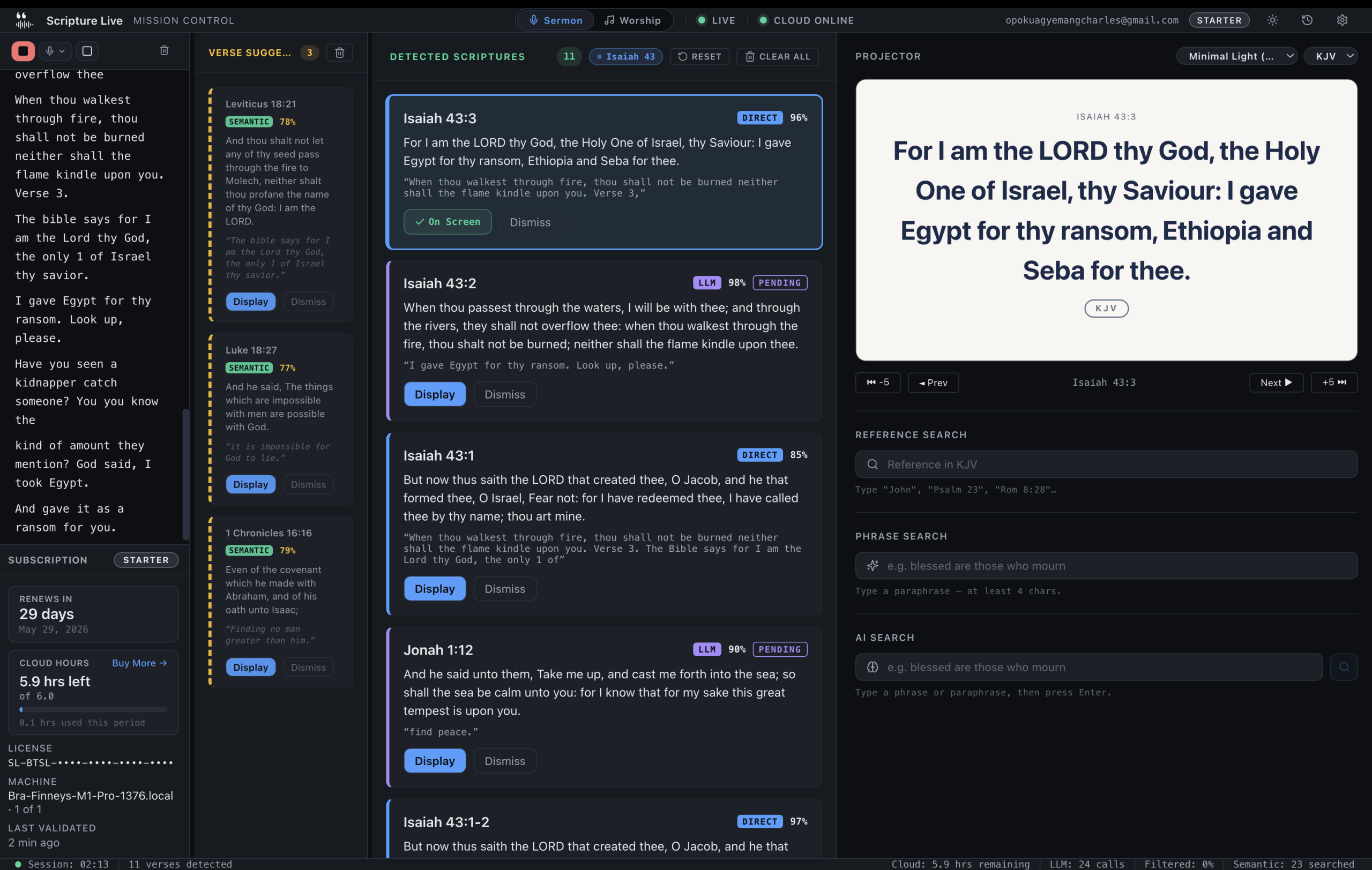
Live scripture detection: the paid magic
TL;DR
– Three-layer pipeline: Pattern (regex, <50ms) → Semantic (local AI, 100-300ms) → Reasoning (cloud, 1-3s).
– Cloud layer never auto-displays — it surfaces approval-queue suggestions; humans always hold the keys.
– Sliding-window detection catches references the pastor builds across multiple sentences.
Watch an experienced operator during a sermon and you can clock the lag. The pastor says “turn with me to Romans chapter eight, verse twenty-eight” — the operator hears it, types into the search bar, scans the dropdown, clicks the right verse, clicks Display. The verse hits the screen somewhere between six and nine seconds after the pastor said it. By that point the pastor has moved on three sentences. Maybe to a parenthetical, maybe to the next verse, maybe to a story about their nephew.
Multiply that by twenty references in a forty-minute sermon. Twenty hits of cognitive overhead. Twenty moments where the operator stopped listening and started transcribing. Twenty places where the screen and the platform were out of sync.
That gap — the operator-typing pain — is what the paid tier of Scripture Live exists to close. This is what you get when you sign in, activate a license, and turn on the cloud features.
How live detection works
The mechanism is worth understanding even if you’re not technical, because it affects what kind of references work and what kind don’t.
When live detection is on, the app captures the sermon audio from your selected input device and streams it to an industry-leading real-time speech-to-text service. Transcript segments come back in real time, both interim guesses and finalised segments. The detection pipeline runs on every finalised segment.
That pipeline isn’t one model trying to do everything. It’s a three-layer detection system running in parallel, each layer tuned for a different kind of reference, and each with a different latency / cost / confidence profile.
Pattern Layer. Sub-50-millisecond response time, runs entirely on the operator’s machine. This is the parser that catches direct, well-formed references — “John three sixteen,” “Romans chapter eight verse twenty-eight,” “second Timothy three verses sixteen and seventeen.” It knows about book aliases (“1 Cor” → 1 Corinthians, “Rev” → Revelation, “Hebrews ch eleven”). When this layer fires with high confidence, the verse is on the screen before the next breath.
Semantic Layer. 100 to 300 milliseconds, also on-device. This is the on-device neural verse search — a local AI search index over the entire Bible. It catches paraphrases. The pastor says “the Lord is my shepherd” — the semantic layer recognises the meaning and returns Psalm 23:1. It catches partial quotes, half-remembered phrasings, anything where the reference is implicit but the wording is close. High-confidence hits auto-display. Lower-confidence hits queue for operator approval. No internet, no quota, runs as fast as your CPU.
Reasoning Layer. 1 to 3 seconds, cloud. This is the heavy paraphrase layer — a frontier reasoning model running on our cloud backend, called over the network with a strict timeout. It catches the cases the Pattern and Semantic Layers miss: heavy paraphrase, theological allusion, references the pastor builds across multiple sentences. It is metered (6 hours / month on Starter, 18 on Team, 40 on Church) because cloud reasoning costs real money. The backend caches identical transcripts within a session, so the same sentence repeated doesn’t bill twice.
There’s a short-circuit rule: if the Pattern Layer hits with high confidence, the pipeline skips the Semantic and Reasoning Layers entirely — no point spending time or budget on a reference we already nailed. The cloud Reasoning Layer fires only when the on-device layers can’t close the gap, and only on the widest sliding-window context.
The sliding window trick
Here’s where the design gets interesting. The pipeline doesn’t just look at the last sentence. It looks at the last 1, 2, and 3 transcript segments and runs detection on each window size.
Why three? Because pastors build references across sentences.
“Paul writes about this beautifully — actually, I’m thinking of Philippians chapter four — verses six through seven.”
A single-sentence detector reads “verses six through seven” and has no idea what book or chapter. A two-sentence window includes “Philippians chapter four” and gets the chapter. A three-sentence window catches the whole arc and resolves to Philippians 4:6-7.
The cost of running detection at three window sizes is small (the Pattern and Semantic Layers are cheap; the Reasoning Layer only fires on the widest window and only when the Semantic Layer didn’t close the gap). The accuracy gain is significant. References that would have been missed by a stricter detector get picked up by the wider window.
The same machinery handles the “verse twenty-six, because Paul builds the argument” case from earlier. The pastor changes their mind mid-sentence; the wider window resolves to the new reference.
What auto-displays and what doesn’t
This is the rule we don’t compromise on, because credibility on stage depends on it.
- Pattern Layer high-confidence hits — auto-display. These are unambiguous. Direct, well-formed, almost always right.
- Semantic Layer high-confidence hits — auto-display. When the on-device search recognises a paraphrase with very high certainty.
- Anything below the auto-display thresholds — queues for operator approval. A card appears in the suggestions panel with the verse text, the confidence score, the source layer (badged blue for Pattern, green for Semantic, purple for Reasoning), and one-click Display / Edit / Dismiss buttons.
- The Reasoning Layer never auto-displays. Ever. Even at top confidence. The cloud reasoning model is too creative for unattended display, and “the AI put a wrong verse on stage” is a category of failure we won’t risk. The operator approves every Reasoning Layer suggestion. This costs a tiny amount of latency and buys a lot of trust.
In practice, churches running this find that the bulk of references auto-display via the Pattern and Semantic Layers, and the harder cases — paraphrases, allusions, theological allusions — surface as one-click suggestions that the operator handles in a couple of seconds. Compared to typing references manually, the speed-up is large. Compared to typing them while also listening to the sermon, the cognitive relief is larger.
There’s also a deduplication rule: the same verse within 30 seconds is suppressed, so a pastor lingering on a passage doesn’t flicker the screen. And there’s a local detection cache, so identical transcripts produce identical results without re-running detection.
AI search for the operator who half-remembers
Live detection is the headline feature. The quieter feature paid users end up loving is AI search.
It works like this: somewhere mid-service, the operator wants a verse the pastor mentioned but didn’t cite — “that thing about being still, in one of the Psalms.” They type “be still and know I am God” into the search bar. AI search runs the query through the same cloud Reasoning Layer that powers live detection, returns Psalm 46:10 with the full text, and the operator clicks Display.
Same engine, different surface. Live detection runs it automatically against transcripts; AI search runs it on demand against the operator’s typed query. Both share the same monthly cloud-paraphrase budget.
For operators with a year of Sunday services in their head, this turns “I know that one but can’t remember where” into a five-second resolution. It’s the most-used feature on weekday rehearsals, when the production team is workshopping a service flow and someone says “isn’t there a verse about…”
Worship lyrics, the second feed, and the network remote
The paid tier ships a full worship lyrics workspace alongside the scripture pipeline.
A structured catalog with sections — Verse, Chorus, Bridge, Pre-Chorus, Tag, Intro, Outro, Interlude. Search by song title, by artist, or by any lyric phrase. Each section becomes its own slide on the projector, so you can step through Chorus → Verse 2 → Chorus → Bridge with one click per section. Songs in the catalog are unlimited at every paid tier.
The lyrics output runs on its own OBS feed at localhost:5545, independent of the scripture feed at localhost:5544. Two browser sources, two streams, two independent operators.
This sounds like a small detail. In practice it changes how a streaming team works.
Without independent feeds, the streaming director has to coordinate every transition. “Hey, hold the lyrics, the pastor’s about to read scripture, swap to scripture, OK we’re back to lyrics.” With independent feeds, the in-room projector and the broadcast scene become orthogonal. The streaming director can hold the worship lyrics on the broadcast for an extra eight seconds while the in-room operator switches to a sermon-recap slide for the people physically in the room. The two operators stop coordinating on every change. Walkie-talkie traffic drops by half.
The other piece of the lyrics workflow is the Network Remote Operator. Pair a tablet or phone on the same Wi-Fi via a 6-digit PIN — LAN-only, no cloud round-trip — and the worship leader on stage can pick the next song from the rail without waving at the operator in the back. The projector follows. The lyrics catalog is searchable from the remote, the section advance is one tap, and the in-room operator gets a clear “leader is driving” indicator so there’s no fight over the source of truth. The pairing flow tells you how many remotes you’ve already paired and how many slots you have left.
Tier limits: 1 paired remote on Starter, 3 on Team, unlimited on Church.
Themes, exports, and the sermon archive
A few more things you get when you upgrade.
Custom themes. The free tier ships two — Classic Dark and Warm. The paid tier lets you build your own. Fonts, colours, image and video backgrounds, logos, layout. 1 saved custom theme on Starter (the “Duplicate theme” button disables when you hit the cap), unlimited on Team and Church. For most churches the visual identity matters; the screen behind the pastor is a brand surface, and a generic black-and-white template doesn’t match a church that has thought about its visual language.
Session history. Every service is recorded as a session — transcript, detected verses, displayed verses, dismissed suggestions. Searchable after the fact. Exports include:
- Pastor PDF — the full transcript with verse callouts inline. The pastor reads back what they preached and where the references landed. Useful for sermon archives, for reviewing how a series flowed, and for re-using content. Unlimited at every paid tier.
- AI Summary PDF — a short summary of the sermon’s themes and references, generated by the cloud reasoning layer. Useful for newsletters, for the church website, and for the “can you write up what was preached” email a small church gets every Monday. (This draws from your monthly cloud paraphrase budget.)
- Hidden training JSONL exports for the geeks who want to feed their own pipelines.
Visible retention in the operator’s session list: 30 days on Starter, 6 months on Team, unlimited on Church. The “AI Summary PDF as sermon archive” workflow is a real reason mid-sized churches go from Starter to Team — the archive becomes part of the service-week rhythm.
Translations. NIV unlocks at Starter (KJV + TWI + NIV — three translations). Team and Church unlock every translation we license — currently thirteen: KJV, TWI, NIV, AMP, ASV, BSB, ESV, MSG, NET, NKJV, NLT, RSV, TPT. The list grows as we license more. We pay translation publishers per copy, which is why this is tiered honestly rather than buried in a feature matrix. (If you ever downgrade, your previously-selected translation falls back to KJV automatically with a polite notice.)
Machines and remotes.
| Tier | Machines | Paired remotes |
|---|---|---|
| Starter | 1 | 1 |
| Team | 3 | 3 |
| Church | 6 | unlimited |
A “machine” is a computer running the operator app. A paired remote is a tablet or phone running the network remote workspace. Most single-campus churches fit Team comfortably; multi-campus churches need Church.
The cost story
Here’s how the tiers break down once everything is layered in.
Starter — GHS 200/month. One operator, one machine, one remote. Live detection with 6 cloud paraphrase hours. KJV + TWI + NIV. One saved custom theme. 30-day visible session history. Standard email support. The entry tier for a small church running one stream and one in-room operator.
Team — GHS 400/month. Three machines, three remotes. 18 cloud paraphrase hours, pooled across all your machines. Every translation we license. Unlimited custom themes. 6-month visible session history with AI Summary PDFs. Priority email support. The most popular tier — fits most production-team setups, fits most mid-size churches.
Church — GHS 800/month. Six machines, unlimited remotes. 40 cloud paraphrase hours, pooled. Every translation we license. Unlimited custom themes. Unlimited visible session history. Phone + email support and an onboarding call for your operators. Built for multi-campus churches and churches with a full A/V crew running scripture, lyrics, broadcast, and recording in parallel.
Yearly billing is available at every paid tier (10× the monthly rate) for churches that prefer to pay once a year.
Cloud paraphrase hours are the only metered thing across all three tiers. Direct-reference detection (Pattern Layer), on-device semantic search (Semantic Layer), AI search, custom slides, themes, projector output, OBS feeds — all unlimited. When the cloud cap is hit for the month, the Reasoning Layer simply goes silent for the rest of the month — the Pattern and Semantic Layers keep running on every segment, so you never lose local detection, only the cloud assist. The budgets are sized to comfortably cover an active church.
Paystack handles payments for Ghana, Nigeria, Kenya, South Africa, Rwanda, Tanzania, Côte d’Ivoire, Egypt, Zambia. Stripe handles everywhere else. Both are billed in GHS; conversion happens at the card-network rate.
Where this lands
The free tier is a real product — the projector, the slides, the on-device search. We mean it when we say it’s permanent.
The paid tier is what you reach for when the pastor preaches faster than the operator can type — and when you’d rather have the operator listening to the sermon than transcribing it. It’s the live detection, the AI search shortcut, the worship lyrics workspace with the second OBS feed, the paired tablet remote for the worship leader, the custom themes that match your church’s visual identity, the session archive that becomes part of how your team runs the week.
If you’re not sure yet, run the free tier on a Sunday and see how it feels. If you already know — install, sign in, start a subscription, and have your operator pay attention to the sermon for the first time in years.
See pricing and start a subscription → scripturelive.app/pricing
Download → scripturelive.app/download
Related reading
- How to put Bible verses on the projector live
- How AI is changing church projection in 2026
- Why your church needs Scripture Live
Try Scripture Live
Free Offline Mode includes the KJV and Twi Bibles, reference and phrase search, custom slides, and the OBS browser-source feed — install on as many machines as you want, no account needed.
📥 Download: scripturelive.app
💵 Pricing: scripturelive.app/pricing










Leave a Reply