
Church presentation software: a 2026 buyer’s guide
TL;DR
– The market splits into media-production tools (ProPresenter), generic presentation (PowerPoint), and scripture-first apps.
– Buy on three axes: speed of verse-display, streaming integration, total cost in your local currency.
– Free trials matter less than feature-complete free tiers — the latter let you actually pilot.
Three months into running a small church’s projector booth, you start to suspect that “church presentation software” is doing a lot of unspoken work as a category label. PowerPoint? Yes, technically. ProPresenter? Yes, obviously. The free thing your last operator’s nephew installed on the booth laptop and nobody can remember the name of? Also technically. The category is wide, the price range is wider, and almost none of the marketing pages actually tell you what the product is for versus what it does.
This buyer’s guide is the document we wish existed when we started Scripture Live in 2024. Six tools. Five evaluation criteria that genuinely matter in 2026 (streaming readiness has moved from nice-to-have to table stakes). Honest profiles, including the gaps. A side-by-side comparison table. And a “which one is for you” section organized by church size and use case, because the right answer depends entirely on your service shape.
Up front: we make Scripture Live, so we’re not neutral. But we’ll tell you flatly when a competitor is a better fit. The fastest way to lose a church-tech buyer’s trust is to oversell, and we’d rather you pick the right tool — even if it’s not ours — than feel mis-sold three months in.
What’s actually in this category
“Church presentation software” usually means a desktop application that drives an in-room projector or screen during a worship service, with a few specific jobs:
- Lyrics on screen during worship songs (with verse markers, repeat counts, sometimes auto-advance)
- Scripture on screen during sermons or readings (a search box, a reference lookup, a verse display)
- Custom slides for announcements, prayer points, sermon notes, offering details
- Output routing to one or more projectors / screens — and increasingly, to a streaming platform
The category overlaps with general presentation tools (PowerPoint, Keynote) and with media production software (vMix, OBS), but a true church presentation tool bundles a Bible database and a song workflow that generic tools don’t.
We’re going to skip the obvious non-options (don’t run your service off PowerPoint in 2026; don’t use ProPresenter just because your last consultant did) and focus on the six tools that show up most often in the actual decision conversations we have with churches.
The five criteria that matter in 2026
If you’re shopping right now, these are the questions that should drive your decision.
1. Streaming readiness. Roughly half the churches we talk to are streaming services on YouTube Live, Facebook Live, or a custom platform — and the other half plan to within a year. The right question isn’t “can this tool be made to work with OBS or vMix?” — almost any tool can, with effort. The right question is “does this tool have a native browser-source output, on-by-default, that streaming software can consume without screen capture?” The difference is the difference between a thirty-second OBS setup and a four-hour cabling project.
2. Pricing model. Subscription versus perpetual license, dollars versus local currency, free tier versus trial-only. Church budgets are real, and the difference between $14/month forever and a $399 one-time license adds up over five years.
3. Language support. English-only is fine if your church is English-only. If you preach in Twi, Yoruba, Swahili, Akan, Spanish, Korean, Mandarin, or any non-mainstream-English language, the question is whether the tool ships your translations or whether you’ll be hand-importing text files for the next year.
4. Learning curve. The operator turns over more often than the gear. Volunteer operators, in particular, can’t be expected to learn a forty-hour production workflow. The right tool for a volunteer-staffed booth is a tool a new operator can run after thirty minutes of supervised practice.
5. What it’s actually built for. This is the criterion most marketing pages obscure. ProPresenter is built for media-rich productions. OpenLP is built for free-and-good-enough. Scripture Live is built for scripture-first churches. None of these are wrong; they’re answers to different questions. Pick the tool whose center of gravity matches your service.
ProPresenter
Renewed Vision’s flagship. The de facto industry standard in the United States.
Strengths. Best-in-class slide production, video playback, multi-output presets, stage display for the worship team, mature CCLI integration, broad ecosystem of plugins and templates. If you’re running a media-heavy production with countdowns, sermon bumpers, animated lower-thirds, and multiple cameras switched between scenes, this is what it’s built for.
Gaps. USD subscription pricing (~$14/month at the entry tier in 2025) doesn’t suit churches operating on Mobile Money rails. No bundled non-English translations beyond mainstream English Bibles. No native browser-source output for streaming — you route through screen capture or NDI in higher tiers. And no live scripture detection from sermon audio: the scripture module is a fast typing experience for the operator, not an automatic one. We have a longer head-to-head in the Scripture Live vs ProPresenter comparison if you want the deep version.
EasyWorship
Long-running tool from Softouch Development, popular with small-to-mid-size US churches.
Strengths. Genuinely friendly learning curve — a new operator can be productive in an hour. Reasonable lyrics workflow, decent scripture lookup, video playback that mostly works, perpetual-license option (no subscription required) for churches that prefer a one-time spend.
Gaps. Windows-only, which is a hard stop for Mac-based booths. The streaming workflow is bolted on rather than designed-in — you’ll need to read forum threads to get a clean OBS feed. Limited non-English translation support out of the box. Looks and feels like software designed in the early 2010s, which isn’t a deal-breaker but does affect the daily experience.
OpenLP
Open-source, free, community-maintained. The “good enough and zero dollars” option.
Strengths. Free forever. Cross-platform (Windows, Mac, Linux). Active community. Imports SongPro and a half-dozen other formats. Good for churches whose budget genuinely is zero and who have a tech volunteer willing to read documentation.
Gaps. UI hasn’t kept pace with commercial tools — it’s functional but dated. Streaming integration requires manual configuration. No live scripture detection (this is true of every tool except Scripture Live, but worth restating). Translation support depends on what the community has imported. Volunteer operators frequently get stuck on configuration details that a paid tool would have abstracted away.
MediaShout
US-based competitor that’s been around since the early 2000s.
Strengths. Mature feature set comparable to EasyWorship, with stronger video and media handling than OpenLP. Decent CCLI integration. Has a reasonable slide editor and a recognizable workflow for operators coming from PowerPoint.
Gaps. Windows-only. Pricing is in USD with subscription tiers that get expensive at the higher levels. The streaming story is similar to EasyWorship — possible but not designed-in. We don’t talk to many MediaShout users in 2026; the product feels like it’s been ceding ground to ProPresenter and EasyWorship rather than gaining it.
Proclaim
Made by Logos / Faithlife. Cloud-first design, tightly integrated with the Faithlife ecosystem.
Strengths. Clean modern UI, real-time team collaboration on service plans (the worship leader can edit a song while the tech operator builds the announcement slides), strong scripture integration via Logos’s Bible library, native macOS support. The team-collaboration angle is genuinely differentiated; nobody else does it as smoothly.
Gaps. Cloud-first means cloud-required for the full feature surface — if your venue has unreliable internet, this is a real risk. Subscription-only, USD pricing, and you end up paying for the Faithlife platform whether you use the broader Logos library or not. Limited non-English Bible support. Like the others, no live scripture detection.
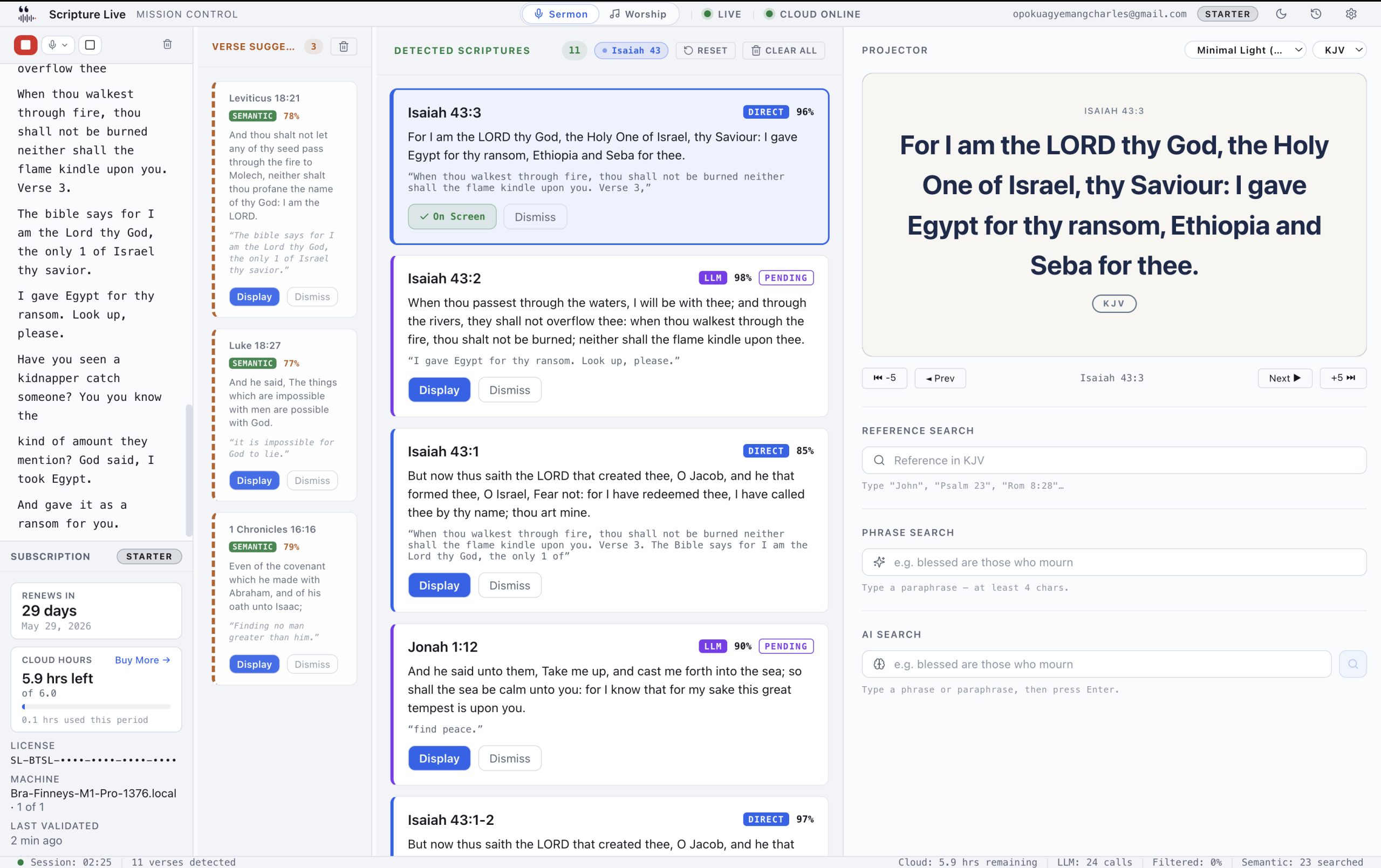
Scripture Live
Our tool. Built around three things ProPresenter and EasyWorship and Proclaim don’t do: live scripture detection from sermon audio, native browser-source streaming output, and a free tier with the full feature surface (only live detection is paid).
Strengths. Three-layer detection pipeline that puts spoken scripture references on screen automatically — a Pattern Layer for direct references, a Semantic Layer for paraphrases, a Reasoning Layer for the ambiguous cases (operator approves the last one). Native browser-source feeds for OBS / vMix / Streamlabs at two separate URLs (scripture and lyrics on independent feeds). Bundled KJV and Twi (Akan) Bibles in every install. Mobile Money / Paystack billing for African churches, Stripe for everyone else. Permanent free tier — Offline Mode — with reference search, phrase search, custom slides, projector output, and OBS feed all unlocked from day one. Network Remote Operator that lets the worship leader control lyrics from a tablet on stage.
Gaps. Slide production is deliberately simple — text and image slides only, no multi-element layout editor. No video playback. Multi-output presets are simpler than ProPresenter’s. Song library is text-driven, not the deep media-asset library ProPresenter operators are used to. If your service is media-rich production-heavy, Scripture Live isn’t the right primary tool — though plenty of churches run Scripture Live alongside ProPresenter for the detection and streaming feeds.
Side-by-side comparison
| Criterion | ProPresenter | EasyWorship | OpenLP | MediaShout | Proclaim | Scripture Live |
|---|---|---|---|---|---|---|
| Free tier | Limited trial | Trial only | Free forever | Trial only | Trial only | Permanent free tier |
| Live scripture detection | No | No | No | No | No | Yes (paid) |
| Native browser-source for streaming | Partial (NDI in higher tiers) | Bolted-on | Manual | Bolted-on | Cloud-only | Yes, two independent feeds |
| Bundled non-English Bibles (Twi/etc.) | No | No | Community imports | No | Limited | KJV + Twi free; 13 translations on Team |
| Pricing | USD subscription | Perpetual + subscription | Free | USD subscription | USD subscription | GHS / USD; Mobile Money + card |
| Mac support | Yes | No | Yes | No | Yes | Yes |
| Slide production depth | Excellent | Good | Basic | Good | Good | Deliberately simple |
| Video playback | Excellent | Good | Basic | Good | Good | None |
| Learning curve for volunteers | Steep | Easy | Moderate | Moderate | Easy | Easy |
| Worship-leader-on-stage remote | No (3rd party) | No | No | No | Limited | Yes (1 / 3 / unlimited by tier) |
A few cells in this table are calls we’re making with limited visibility into competitor roadmaps. If ProPresenter shipped sermon-audio detection in a recent point release we missed, or if MediaShout’s streaming integration has improved since we last looked, we’d genuinely want to know — corrections are welcome.
Which one is for you
Some honest matchmaking, by the kind of church you actually run.
Small church, tight budget, volunteer operators, English-only. OpenLP if your tech lead is comfortable with documentation. Scripture Live’s free Offline Mode if you want a friendlier UI and an upgrade path for when you eventually want detection or streaming. Don’t pay for a tool you don’t yet need; you can always upgrade later.
Mid-size church, growing streaming audience, mixed staff/volunteer. Scripture Live, with a Starter or Team plan when you’re ready for detection. The browser-source streaming workflow alone saves the streaming team hours per month, and the detection capability genuinely changes how the booth feels during sermons. We have a longer treatment of the free-vs-paid question if you’re trying to decide what tier you need.
Twi-speaking, Yoruba-speaking, Swahili-speaking, or otherwise non-English-mainstream church. Scripture Live has the cleanest answer here — bundled Twi Bible in the free tier, more translations on paid plans. Other tools require manual imports or simply don’t ship the translations.
Large church, professional production team, multi-camera service. ProPresenter is the right primary tool. Pair it with Scripture Live for the live detection and streaming feeds — many churches we work with run both.
Cloud-collaborative team, distributed worship and tech roles. Proclaim, if you’re already in the Faithlife ecosystem and your venue’s internet is reliable. Otherwise Scripture Live’s Network Remote Operator covers the on-stage worship-leader use case without requiring a cloud round-trip.
FAQ
Do I need to pay for church presentation software? No. OpenLP is free forever, and Scripture Live’s Offline Mode is a permanent free tier with a fuller feature surface than most paid trials. Pay when you need a specific paid feature (detection, streaming feeds, more translations) — not because the marketing page told you to.
Can I use PowerPoint? Technically yes, in the same sense that you can technically cut your hair with kitchen scissors. The workflow falls apart the moment your pastor goes off-script, the moment you want to add a song, or the moment you start streaming. Use a real tool.
What about CCLI reporting? ProPresenter and EasyWorship have built-in CCLI integration. Scripture Live tracks the songs you display; export and reporting helpers are on the roadmap rather than shipping today. If CCLI compliance is a hard requirement and you don’t already have a tracking workflow, factor that in.
Will Scripture Live work alongside ProPresenter? Yes, and many churches run both. Scripture Live takes the sermon-audio detection and streaming-feed jobs; ProPresenter handles the heavy media production. They don’t conflict.
How do I demo these without committing? All six have free tiers or trials. Install two or three on a booth laptop, run a real practice service through each, and pick the one your operators don’t complain about after the third Sunday. Marketing pages are unreliable; a real service is the only clear test.
The category has matured a lot since 2010, and the right answer for your church in 2026 is probably not the answer your last consultant gave you in 2018. If scripture-first, streaming-first, and free-tier-first sound like the right priorities, Scripture Live is built for that shape of decision — you can download the free version at scripturelive.app and run it through a service before paying for anything.
Related reading
- Scripture Live vs ProPresenter
- Free vs paid: when does it matter?
- Offline Mode: free Bible projection
Try Scripture Live
Free Offline Mode includes the KJV and Twi Bibles, reference and phrase search, custom slides, and the OBS browser-source feed — install on as many machines as you want, no account needed.
📥 Download: scripturelive.app
💵 Pricing: scripturelive.app/pricing












Leave a Reply