
Free vs paid Bible projection software: when does the difference actually matter?
TL;DR
– Free tools work for basic verse projection if your operator can keep up by typing.
– Paid tiers earn their keep when you need live detection, streaming feeds, or multi-machine setups.
– Scripture Live’s free Offline Mode is genuinely useful — most churches stay there for the first month.
Every church tech lead, at some point, sits down with a spreadsheet and asks the same question: do we really need to pay for projection software, or can we make a free tool work?
It’s the right question to ask. Free Bible projection software exists, some of it is genuinely good, and a lot of churches use it for years without complaint. At the same time, paid tools exist for specific reasons — and there are services and configurations where the free tools simply break.
This article is an honest comparison. We’ll walk through what’s actually free, where it stops being enough, and the math on when GHS 200 a month pays for itself. We make a paid product, so there’s no pretending we’re neutral — but we’d rather you start with our free tier and grow into the paid one than oversell you on day one. The free tier of Scripture Live exists precisely because we believe a lot of churches don’t need the paid one yet.
The free Bible projection software landscape
A quick survey of what you can actually run for zero dollars right now.
OpenLP. Open-source, cross-platform, has been around for over a decade. Real Bible support, song library, theme system. The interface feels like a Windows XP-era tool, which puts off a lot of newer operators, but for churches with a patient volunteer it does the job.
Manual PowerPoint or Keynote decks. A surprising number of churches still build a slide deck for each service with verses pre-pasted in. Free if you already own Office or use Google Slides. Brittle the moment the pastor goes off-script.
Web-based Bible tools (Bible Gateway, YouVersion, Logos). Operators search for a verse on a website and screen-share the browser to the projector. Workable as a stopgap; ugly typography, no theme control, slow under load.
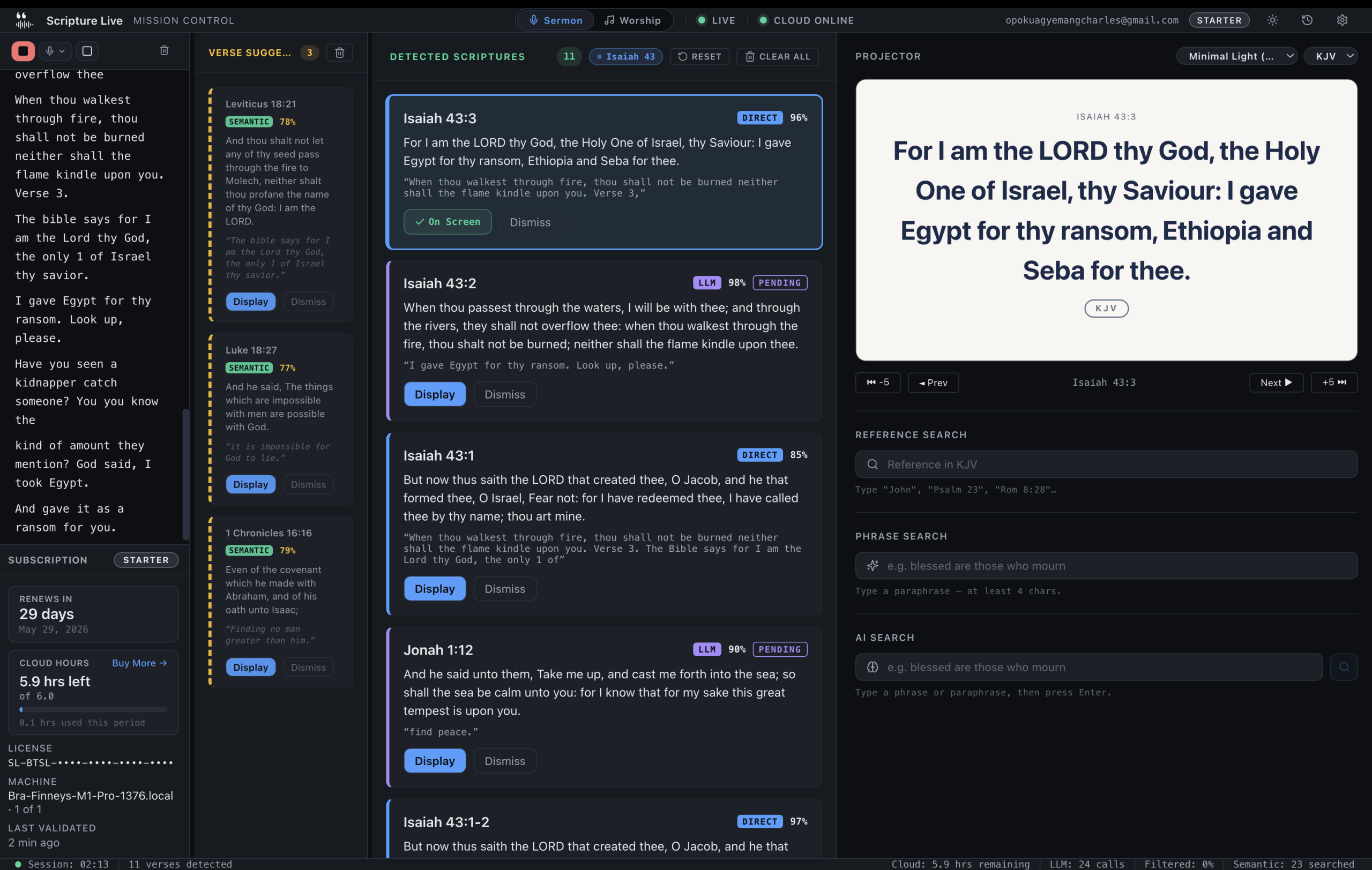
Scripture Live Offline Mode. Our own free tier. KJV and Twi Bibles bundled in the installer, reference search, phrase search using on-device neural verse search, custom slides, projector window, OBS feed. No account required, no time limit, unlimited installs across machines. We covered the full feature list in the Offline Mode write-up.
Each of these has a particular shape, and the clear answer to which is best? depends on the kind of service you’re running.
What you actually get free with Scripture Live
The free tier is the same desktop binary as the paid tier, with the cloud features off. To be specific about what’s included:
- KJV and Twi Bibles, both bundled in the installer. No first-run download, no “log in to fetch translations.” Roughly 31,000 verses for KJV plus the full Twi Bible, indexed for instant full-text search.
- Reference Search — type John 3:16 or Romans 8:28-30 and get the verse. The book-alias parser understands shorthand like 1 Cor 13 or Hebrews ch 11.
- Phrase Search — type a paraphrase like blessed are the peacemakers and get Matthew 5:9 back. This runs the same on-device neural verse search the paid version uses; we did not strip it out of the free tier.
- Custom Slides — text and image slides, three image fit modes, full theme support. Sermon notes, prayer points, offering details, series art. The full feature set is documented in the custom slides article.
- The projector window — borderless fullscreen on a secondary display, two built-in themes (Classic Dark and Warm), fade / slide / cut transitions.
- OBS and vMix integration — local browser-source feed at
http://localhost:5544from the moment the app launches. - Unlimited installs. Office laptop, mid-week laptop, Sunday booth machine — install on every one.
What you don’t get: live detection from sermon audio. That’s the paid feature, and we’ll get to where it actually matters.
When free is enough
For a meaningful slice of churches, the free tier is the whole answer. Specifically:
Small congregations under a hundred people. If the pastor sends references in advance and the service has a predictable rhythm, an operator with reference search and a calm pace can handle it. The bottleneck of operator typing speed only really hurts when the pastor moves fast or paraphrases heavily; if your pastor reads cleanly from a printed manuscript, manual search is fine.
Churches with no live streaming. If the only output is the in-room projector, the cost of an out-of-sync verse is a few seconds of social awkwardness. If you’re streaming, that same out-of-sync moment is permanently archived on YouTube for anyone to point at.
Pastors who use a single translation. If your pastor reads exclusively from KJV (or exclusively from Twi), the bundled translations are everything you need. The paid tier’s value scales with how often your pastor swaps between translations live.
Churches with intermittent internet. Live detection requires cloud transcription. If your bandwidth is unreliable, the paid features will be unreliable too — Offline Mode is genuinely the better fit, not a step down.
Churches in evaluation mode. You don’t have to commit to anything to use the free version. Install it on the booth machine, run a few services with manual search, and only upgrade when you’ve felt the limits.
If you’re in any of these buckets, download the free version, set it up, and we’ll be here when you want more.
When paid pays for itself
The gap between free and paid is not a feature checklist. It’s a workflow gap. Here’s where it actually opens up.
Live streaming teams. If your service is broadcast on YouTube, Facebook, or a live stream the church operates itself, the cost of an out-of-sync verse goes from “awkward” to “archival.” A pastor who quotes Romans 8:28 and the screen behind them shows Welcome to Sunday Service is a clip that gets shared at 1.2x speed by people who think it’s funny. Live detection eliminates that whole class of mistake. We wrote about the streaming workflow in the case for live detection.
Fast-paced or improvisational pastors. If your pastor frequently goes off-script — “actually, hold on, look at verse twenty-two for context” — manual operators can’t keep up. The Pattern Layer in the live detection pipeline catches direct references in under fifty milliseconds. The Semantic Layer catches paraphrases like “the Lord is my shepherd” and offers Psalm 23:1 as a one-click suggestion. The operator stops being a typing bottleneck.
Churches that want multiple translations on the fly. The paid tier’s translation library — KJV, TWI, NIV at Starter; AMP, ASV, BSB, ESV, MSG, NET, NKJV, NLT, RSV, TPT added at Team and Church — lets the operator switch translations live during a service. If your pastor says “in the NIV that reads as…”, the operator drops the dropdown and the next verse is in NIV.
Multi-campus operations. If you run two or three campuses simultaneously, the Team tier (3 machines, 18 cloud hours pooled) or Church tier (6 machines, 40 cloud hours pooled, unlimited worship remotes) is built for the shape of your operation. Pooled hours mean a slow Sunday at one campus subsidises a busy Sunday at another.
Operators who burn out doing transcription. This one is harder to see in a budget. A volunteer operator who spends every Sunday morning typing as fast as they can, listening for references instead of the sermon, will eventually quit. Live detection turns the operator role from data-entry into editorial — they review, they pick, they cue. It’s a different job, and most volunteers want the second one.
The reverse case is worth saying too. If your church is none of these things, the free tier is genuinely fine. The paid version is for specific shapes of operation, not for everyone.
Why our free tier exists at all
A reasonable question: if Scripture Live makes money on the paid tier, why ship a free version that includes most of the surface area?
Two reasons, both straight.
First, we built the app for African churches first, and a meaningful share of African churches can’t justify a monthly subscription on top of speakers, projectors, and salaries. A permanent free tier is the only ethical way to ship this product into those rooms. We wrote about this more in the African churches article, but the short version: the free tier is non-negotiable.
Second, we’d rather have a church use Offline Mode for two years and then upgrade than not exist in their workflow at all. The paid features are genuinely valuable to specific churches; we don’t need to scare the others into paying for things they won’t use.
The break-even math at GHS 200/month
Let’s do the math, because spreadsheet questions deserve spreadsheet answers.
Starter tier — GHS 200/month. That’s GHS 50 per Sunday for a church that meets weekly. Yearly billing brings it to GHS 2000 (about GHS 38 per Sunday).
If your operator is paid hourly (in many churches they are, even modestly), the math is simple. A Sunday morning of typing scripture into search bars takes most operators ten to fifteen minutes of concentrated effort across a sermon — not the whole service, but the cognitive load adds up. If the operator is paid GHS 30/hour, the time savings alone don’t break even at GHS 200.
But that’s not the right framing. The right framing is: what’s the cost of one missed or misaligned verse on the live stream? If the answer is “meaningful — we have a stream that runs 500+ views per service,” the paid tier pays for itself the first time it catches a paraphrase the operator wouldn’t have. If the answer is “low — we’re not streaming yet,” the free tier is the right choice and you can revisit when you start streaming.
The Team tier (GHS 400/month, three machines, three remotes, eighteen pooled cloud hours) breaks even differently — it’s pricing per campus or team, not per machine. If you run a main service plus a Wednesday service plus a youth service, three machines are useful even if you only need detection on Sundays.
The Church tier (GHS 800/month) is targeted at multi-campus operations and includes unlimited worship remotes plus phone support and an onboarding call. If you’re a single-campus church under 500 people, you don’t need it.
Yearly billing is 10× monthly across all tiers — two months free, effectively. Worth it if you’re confident you’ll stay subscribed; not worth it on month one.
Plain summary
| If you are… | Free is right | Paid is right |
|---|---|---|
| Small congregation, no streaming | Yes | No |
| Pastor reads from a single translation, manuscript-style | Yes | No |
| Streaming team with archived broadcasts | No | Yes (Starter or Team) |
| Multi-campus or multi-service operation | No | Team or Church |
| Operator currently burning out on transcription | No | Yes |
| Intermittent internet, evaluating the workflow | Yes | Revisit later |
| Twi-speaking congregation with mixed-language sermons | Yes (Twi is bundled free) | Paid adds live detection across both languages |
FAQ
Q: Is Scripture Live’s free tier really free, or is it a trial?
Permanent free tier. No trial timer, no card required, no account required. Install it, use it forever, upgrade if and when you want live detection.
Q: Can I use the free tier on multiple machines?
Yes, unlimited installs. The machine cap (1 / 3 / 6) only applies to paid tiers.
Q: What happens if I subscribe and then cancel?
Your install reverts to Offline Mode. You keep the bundled Bibles, custom slides, projector output, and OBS feed. You lose live detection and access to the additional translations.
Q: How does the free tier compare to OpenLP?
OpenLP is mature and free, with a wider song library out of the box. Scripture Live’s free tier has a more modern interface, on-device phrase search, an OBS browser-source feed, and bundled Twi support. Different shapes; both legitimate.
Q: What’s the cheapest path to live detection?
The Starter tier at GHS 200/month, or GHS 2000/year. One machine, one worship remote, six cloud paraphrase hours per month, KJV + TWI + NIV.
Get started
The direct path is the right one: download the free version, run it on your booth machine for a few Sundays, and see whether the free tier is enough for your shape of service. If it is, you’ve got a permanent solution at zero cost. If you start to feel the limits, the paid tiers are at scripturelive.app and they’ll be ready when you are.
Related reading
- Offline Mode: free Bible projection
- Scripture Live vs ProPresenter
- What live scripture detection actually does
Try Scripture Live
Free Offline Mode includes the KJV and Twi Bibles, reference and phrase search, custom slides, and the OBS browser-source feed — install on as many machines as you want, no account needed.
📥 Download: scripturelive.app
💵 Pricing: scripturelive.app/pricing












Leave a Reply