
Offline Mode: free Bible projection for every church
TL;DR
– Permanent free tier — no trial countdown, no watermark, no nag screens.
– KJV + Twi Bibles bundled offline; reference + phrase search; custom slides; OBS browser source.
– Zero outbound API calls; works on rural, low-bandwidth, or no-internet setups.
The first version of Scripture Live we ever shipped required an internet connection, an account, and a credit card. It worked beautifully in the room we built it in — a downtown church with fibre, a paid AV operator, and three Apple displays. It worked less beautifully in the rooms we kept hearing about: a 90-person congregation in Kumasi where the Wi-Fi cuts out during the offering, a Twi-speaking church plant where English speech-to-text was never going to be useful, a youth pastor in Accra trying to evaluate the app on a borrowed laptop without committing to a subscription before the next leadership meeting.
We built Scripture Live for the first kind of church, and then we kept getting asked by the second kind of church to please, please find a way to make it work for them too.
This release is the answer. Scripture Live v1.1.1 ships Offline Mode — a permanent free tier that turns the same desktop binary into a real, useful Bible projection tool for any church, with no account, no internet, and no trial timer.
What’s actually in it
Offline Mode is not a stripped-down preview. It is the projector pipeline, the slide system, and the search infrastructure of the paid app, with the cloud features turned off.
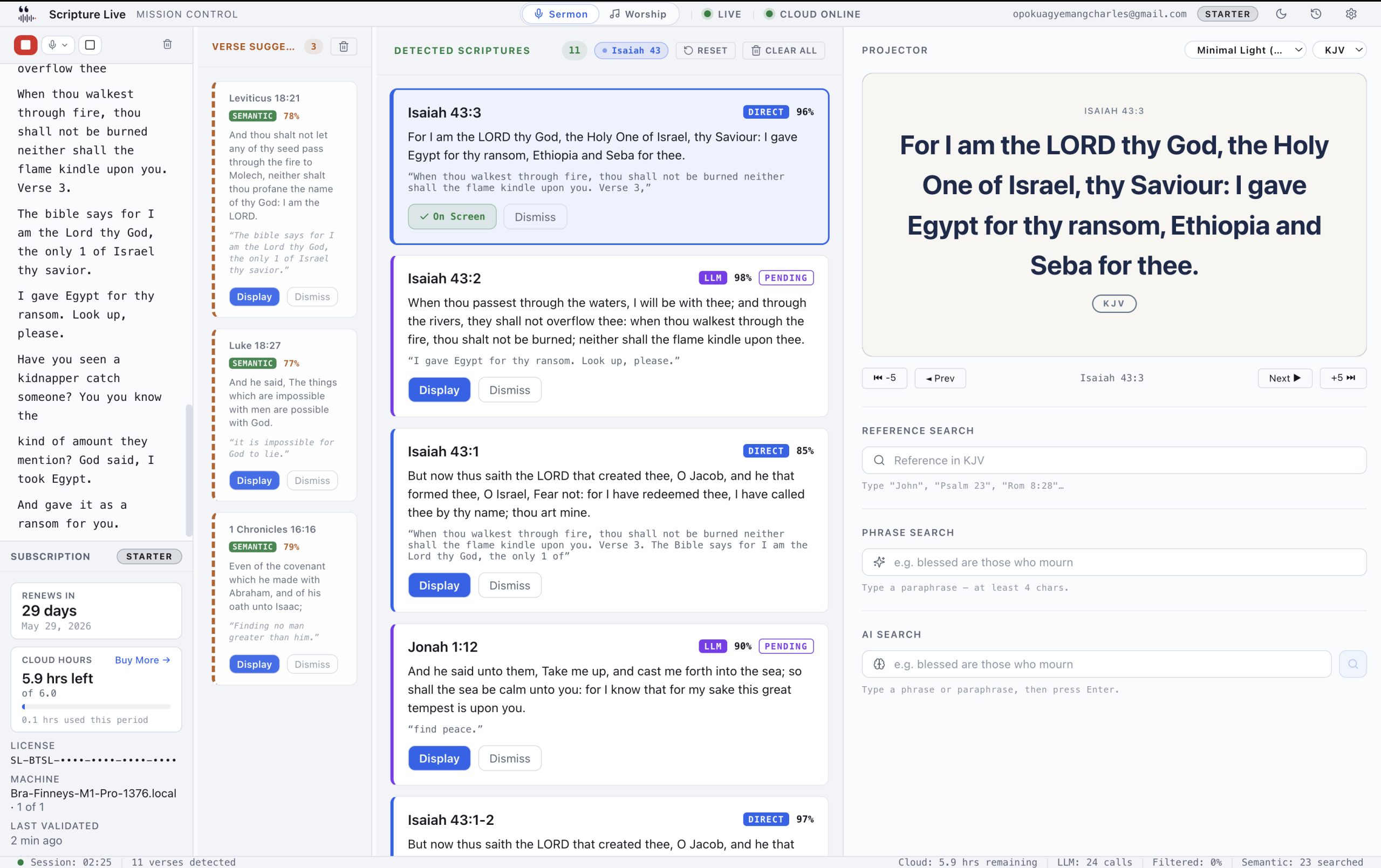
When you launch without signing in, the operator window shows you exactly the surfaces you can use — Reference Search, Phrase Search, Custom Slides, and the projector. There’s no half-greyed-out transcript pane teasing the paid features. The free tier is a clean, complete product, and the only doorway to the paid features is a single “Sign in to unlock live detection” CTA.
Specifically, the free version includes:
- KJV and Twi (Akan) Bibles bundled. Both translations ship inside the installer. No first-run download. No “log in to fetch translations.” Open the app, search a reference, project it. Roughly 31,000 verses for KJV and the full Twi Bible, both indexed for instant full-text search.
- Reference Search. Type “John 3:16” or “Psalm 91” or “Romans 8:28-30” and get the verse. Same parser the paid version uses, including the book-alias table for shorthand like “1 Cor 13” or “Hebrews ch 11.”
- Phrase Search. Type a paraphrase you half-remember — “blessed are those who mourn” — and get Matthew 5:4 back. This runs on the same on-device semantic search the paid version uses; we did not strip it out of the free tier. It runs entirely on the operator’s machine. No internet, no API calls, no quota.
- Custom Slides. Text slides, image slides, three image fit modes, projector display, the full feature set. We wrote about this separately, but the short version: it’s the everything-that-isn’t-scripture surface — sermon notes, prayer points, offering details, “Welcome,” series titles. Available identically in free and paid.
- The projector window. Borderless fullscreen on a secondary display. Picks up the connected projector automatically. Two built-in themes (Classic Dark and Warm). Same fade / slide / cut transitions the paid version uses.
- OBS and vMix integration. A local browser-source feed runs on port 5544 from the moment the app launches. Drop
http://localhost:5544into OBS as a Browser Source and your stream gets the same scripture feed the in-room projector shows. Independent of the in-room display, updates live, transparent mode available with?transparent=truefor overlay use. - Install on as many machines as you want. No license, no machine cap. Set the free tier up on the office laptop, the mid-week laptop, and the Sunday booth machine without thinking about it.
That’s not a “lite” version. That’s most of what an evaluating tech lead actually wants to demo on a Sunday.
What it doesn’t do
Honesty matters here, so it’s worth being explicit about what Offline Mode leaves out:
- No live detection from sermon audio. The three-layer detection pipeline (Pattern, Semantic, Reasoning) needs cloud transcription for the speech-to-text feed and a cloud reasoning model for the hardest paraphrases. Both cost real money per minute. Both are gated to paid tiers.
- No AI search shortcut. The free version’s Phrase Search is the on-device semantic layer; the paid version adds a cloud Reasoning Layer pass for the harder paraphrases.
- No worship lyrics workspace. Lyrics catalog, sections (Verse / Chorus / Bridge), the second OBS feed on port 5545, the network remote operator — all paid-tier.
- Two translations only. KJV and Twi. NIV unlocks at Starter; every translation we license (currently thirteen — KJV, TWI, NIV, AMP, ASV, BSB, ESV, MSG, NET, NKJV, NLT, RSV, TPT) unlocks at Team and Church. We don’t ship licensed translations in the free tier because Bible publishers charge real money for translation rights, and “free forever” needs to actually be free forever.
- Two themes. Classic Dark and Warm. Custom themes (fonts, colours, backgrounds, logos) are paid-tier — one saved theme on Starter, unlimited on Team and Church.
- No session history. Sessions, transcripts, and pastor PDFs are paid-tier features.
If your operator is fine typing references and your sermons aren’t being detected live, Offline Mode is a complete product. If your pastor preaches fast, paraphrases often, or you’ve got a streaming team that wants verses in under two seconds, you’ll feel the gap.
Zero outbound API calls. We mean it.
This is the trust signal we want to make explicit, because it matters more in some contexts than others.
When the app is unlicensed, it makes no outbound network requests beyond the auto-update check. No telemetry. No “anonymous usage analytics.” No cloud transcription. No cloud reasoning. No cloud sync of slides or themes. No remote license validation, because there’s no license.
For churches with metered bandwidth, that’s the difference between a $40 monthly data bill and a $0 one. For churches with privacy concerns about sermon audio leaving the building, that’s the difference between “we’re not sure” and “we know.” For IT-cautious denominations doing a security review before approving the app, that’s a one-line answer.
The auto-update check itself is a single HTTPS request to our update server every 24 hours. It returns a version number and a download URL. If you don’t want even that, the app respects a setting to disable update checks, and the latest installer is always available manually from our site.
Three audiences this was built for
We wrote earlier that Offline Mode exists because three specific church segments kept asking for it. Each of them gets something a little different out of the same product.
Churches without reliable internet
The Wi-Fi at a 60-person rural congregation outside Tamale is not the Wi-Fi at the corporate office down the road. It comes and goes. It works during the announcements and disappears during the sermon. It works on the pastor’s laptop and not on the AV operator’s, because someone moved the router.
Cloud-only projection software fails in those rooms in the worst possible way: it fails during the service, when the operator can’t reboot anything, can’t ask for support, and can’t switch tools. Scripture Live’s free tier never goes down because of internet, because it doesn’t depend on internet. The Bible is in the installer. The search index is in the installer. The projector pipeline runs entirely on the operator’s machine.
If you’ve ever had to apologise from the platform because “the screen will be back in a minute,” this version of Scripture Live is for you.
Non-English-speaking congregations
English speech-to-text doesn’t help a Twi-speaking church. It also doesn’t help a Yoruba-speaking church, a Swahili-speaking church, or a French-speaking parish. We’re working on multilingual transcription — it’s hard, and we’d rather ship it well than ship it badly — but in the meantime, those congregations were getting nothing from us at all.
Bundling Twi was the obvious first step. The Twi Bible ships in the same local library as KJV. Search works. Phrase Search works (the on-device semantic index covers Twi). The projector renders Twi cleanly with the bundled fonts. A Twi-speaking operator can search “Yohane 3:16” and project the verse — and a Twi-speaking pastor preaching from the platform doesn’t need to switch out of their language to get scripture on screen.
We’ll be adding more African-language Bibles. Yoruba is high on the list. If you’re at a church that needs a specific translation, write to us — translation licensing is a slow process and we plan it months in advance.
Churches still evaluating
This is the segment we underserved most badly with the original release. A youth pastor or volunteer AV lead doing due diligence on a new tool can’t always justify a credit card on day one. The decision is “can we live with this for three months,” not “will we use it forever starting Sunday.”
Offline Mode is a real product they can run for three months. The projector keeps working. The OBS integration keeps working. The slides keep working. Reference Search and Phrase Search keep working. When the leadership team finally meets and approves a budget — or doesn’t — you’ve already had a hundred Sundays of evidence either way.
If you do decide to upgrade, the path is clean: sign in with email or Google, enter a license key (or start a subscription from inside the app), and the paid features unlock immediately without a restart. Custom slides you authored in Offline Mode are still there. Themes you set up are still there. The projector picks up where it left off. We don’t make you redo the work.
How it works under the hood (briefly)
For tech leads who want the architecture: Offline Mode is the same desktop app as the paid version, with feature flags gating the cloud features. The app boots, checks for a license token, and if there isn’t one, lands the user in the unlicensed workspace. The free workspace renders only the routes the free tier supports. The app never opens a transcription socket, never makes a cloud reasoning request, never hits our backend.
The on-device pieces — the bundled Bible library for KJV and Twi, the on-device semantic search index, and the local AI runtime — all ship as bundled resources in the installer. They’re the same files the paid version uses; there’s no separate “free build” pipeline to maintain.
That matters for one practical reason: upgrading is a sign-in, not a download. You’re not switching to a different application. You’re enabling features that are already on disk.
Try it
Scripture Live v1.1.1 is live now on macOS, Windows, and Linux. Free Offline Mode requires no account.
If your church already runs cloud-only projection software and it’s working, this might not be for you yet. If your church doesn’t run any projection software because the existing options were too expensive, too cloud-dependent, or didn’t speak your language — please install it. Tell us what breaks. We’ve spent two years figuring out how to make church-tech work for churches the rest of the industry skipped over.
Download → scripturelive.app/download
See what each tier adds → scripturelive.app/pricing
Related reading
- Why your church needs Scripture Live
- Free vs paid: when does it matter?
- A Bible projection app for African churches
Try Scripture Live
Free Offline Mode includes the KJV and Twi Bibles, reference and phrase search, custom slides, and the OBS browser-source feed — install on as many machines as you want, no account needed.
📥 Download: scripturelive.app
💵 Pricing: scripturelive.app/pricing












Leave a Reply