
Why your church needs Scripture Live
TL;DR
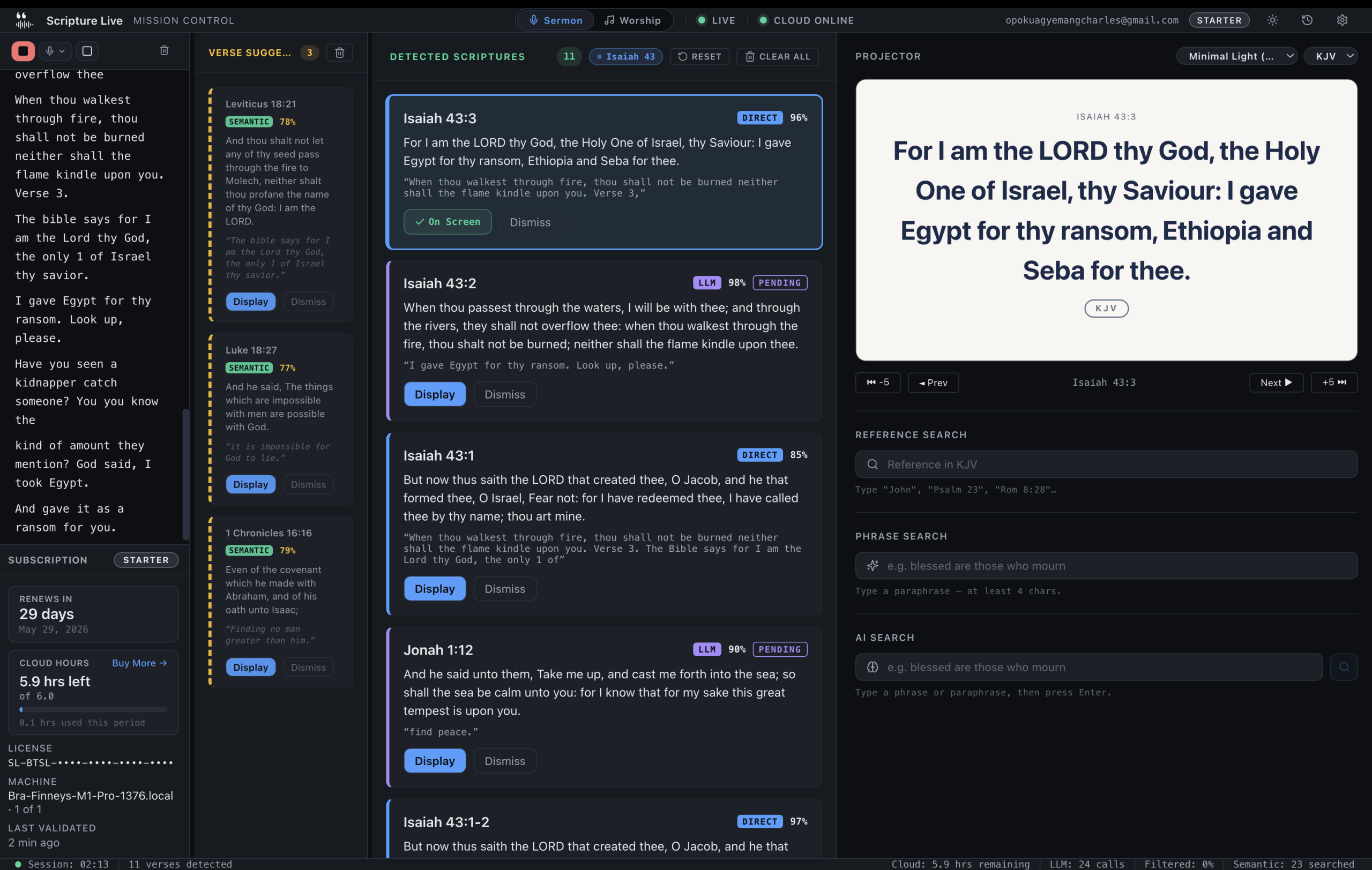
– Live verse detection from sermon audio — verses appear in under 2 seconds, not 6–9.
– Three-layer detection pipeline (Pattern → Semantic → Cloud reasoning), local-first.
– Permanent free Offline Mode (KJV + Twi + custom slides + OBS feed); paid from GHS 200/mo.
It’s 9:47 on a Sunday morning. The operator is in the back row, laptop balanced on a folding table, headphones half on. The pastor is twelve minutes into the sermon and has just said, “Now look with me at Romans chapter eight, verse twenty-eight — actually, let’s start at verse twenty-six, because Paul builds the argument…”
The operator has about four seconds. They start typing Romans 8:28 into the search bar. Halfway through, they realise the pastor said twenty-six. Backspace. Re-type. Click the verse. Click Display. By the time the projector updates, the pastor is on a different sentence and someone in the second row is checking their phone because the screen behind the pastor still says Welcome to Sunday Service.
This is what most church projection looks like. Not because operators are slow — they’re not — but because the tool was never designed for the speed of preaching. It was designed for the speed of typing.
Scripture Live is a desktop app that closes that gap. It listens to the sermon, detects scripture references the moment they’re spoken, and puts them on screen without anyone touching a keyboard. It also handles worship lyrics, custom slides, projector themes, and a clean OBS / vMix integration for streaming churches. And it has a permanent free tier that’s actually useful — not a 30-day trial.
This article is the broad case. If you’re a tech lead or a pastor weighing whether to bring this into your church, here’s what’s worth knowing.
The core problem: operator reaction time
In every church we’ve looked at, the bottleneck is the same. The pastor speaks faster than a person can type, and the operator’s reaction time — hear the reference, recognise it, type it, click display — sits at six to nine seconds on a good day.
That’s not a complaint about operators. It’s just physics. People can’t type as fast as a pastor can talk, and a pastor in the flow of a sermon doesn’t pause for the projector to catch up.
The downstream effects show up everywhere:
- The verse appears as the pastor moves to the next one, so the screen is always one beat behind.
- The operator misses the reference entirely if the pastor paraphrases instead of quoting (“be still and know that I am God” is what most people hear; the screen needs to show Psalm 46:10).
- The streaming team gets out-of-sync footage where the YouTube viewer hears one verse and reads another.
- The operator stops listening to the sermon — they’re a transcription machine for an hour.
ProPresenter, EasyWorship, OpenLP — they’re all good tools, but none of them solve this. They’re faster keyboards. The operator still has to do the listening, the recognising, and the typing.
Scripture Live moves the listening and recognising into software.
How live detection works (the three-layer pipeline)
The interesting bit, even at a high level, is that the app doesn’t use a single AI model trying to do everything. It runs a three-layer detection pipeline on every chunk of transcript, each layer tuned for a different kind of reference.
Pattern Layer — under 50 milliseconds, on-device.
Catches direct, well-formed references. “John three sixteen,” “Romans chapter eight verse twenty-eight,” “second Timothy three sixteen and seventeen.” When this fires with high confidence, the verse is on screen before you finish blinking. No internet required.
Semantic Layer — 100-300ms, on-device.
A neural verse search runs locally on the operator’s machine, against a local AI search index built over the entire Bible. This catches paraphrases and partial quotes. The pastor says “the Lord is my shepherd, I shall not want” — the semantic layer recognises the meaning, returns Psalm 23:1, and the operator gets a one-click suggestion. Still no internet required.
Reasoning Layer — 1-3 seconds, cloud.
For the hardest cases — heavy paraphrase, theological allusion, references the pastor builds across a sentence — a frontier reasoning model in the cloud fills the gap. This is the only layer that uses the internet. It’s metered (6 / 18 / 40 hours per month depending on tier) because cloud reasoning costs real money to run.
The clever part is the sliding window. The pipeline doesn’t just look at the last sentence; it looks at the last 1, 2, and 3 transcript segments and runs detection on each. So when a pastor builds a reference across two sentences — “Paul tells us… I’m thinking of the passage in Philippians chapter four” — the detector sees the whole arc, not just the final clause.
There’s also a hard rule we don’t compromise on: the Reasoning Layer never auto-displays. High-confidence Pattern Layer hits go to the screen automatically. High-confidence Semantic Layer hits go automatically. Anything from the Reasoning Layer lands in an approval queue, one click from the operator, never on the projector without a human saying yes. That distinction is why the pipeline can be aggressive about catching paraphrases without becoming embarrassing on stage.
Streaming-first, not streaming-as-an-afterthought
Most church projection software treats the live stream as a secondary output. You point an OBS scene at the screen, hope the resolution lines up, and pray the operator doesn’t accidentally show Welcome over a Communion shot.
Scripture Live treats the OBS feed as a first-class output. The app exposes two independent local browser-source feeds:
localhost:5544— the scripture feed (verses, custom slides)localhost:5545— the lyrics feed (worship songs)
Both are browser sources you drop into OBS or vMix. Both update in real time. Both are independent — and that independence is the point.
It means your streaming team can show a sermon-notes slide on the in-room projector while the broadcast scene keeps the worship lyrics from the previous song for a few extra seconds. It means the in-room operator can switch to a Bible verse without the streaming director having to coordinate. Two operators, two workflows, one source of truth.
For churches running real broadcasts — anything beyond a single static camera — this is the difference between a smooth Sunday and a Sunday spent radioing the booth every two minutes.
The pricing story
Most church-tech buyers we talk to start with one question: what does it cost?
Here’s the clear answer.
| Tier | Price/month | Built for |
|---|---|---|
| Offline | Free | Any church — especially rural, non-English, or evaluating |
| Starter | GHS 200 | One operator, one booth |
| Team | GHS 400 | A small production team — 3 machines, 3 paired remotes |
| Church | GHS 800 | Multi-campus, full team — 6 machines, unlimited remotes |
GHS is Ghana Cedi. At today’s rate, GHS 200 is roughly USD $13. Starter is about a third of what ProPresenter charges to start. Church-tier is about half of what most multi-machine licenses cost from competitors, and it ships with the live detection pipeline that nobody else has. Yearly billing is available at every paid tier (10× the monthly rate) for churches that prefer to pay once a year.
The only metered thing is the cloud paraphrase budget — 6, 18, or 40 hours per month per tier, pooled across all your machines. Direct references and on-device semantic search are unlimited at every paid tier. When the monthly cap is hit, the cloud Reasoning Layer simply goes silent for the rest of the month — the Pattern and Semantic Layers keep running on every segment, so you never lose local detection, only the cloud assist.
Paystack is the primary payment provider (cards, Mobile Money, USSD, bank transfer for Ghana / Nigeria / Kenya / South Africa / Rwanda / Tanzania / Côte d’Ivoire / Egypt / Zambia). Stripe handles everywhere else. The product is built by a Ghanaian founder primarily for African church markets, but it works globally — and prices in GHS for everyone, because converting a clean number into nineteen currencies makes the table unreadable.
The free tier is not a trial
This part is worth slowing down on.
Scripture Live’s free tier — Offline Mode — is permanent. No 30-day countdown. No watermark. No nag screens. No license needed; install on as many machines as you want. It’s the same binary as the paid version, and it includes:
- KJV and Twi (Akan) Bibles bundled — no download, no account, no internet
- Reference Search (“John 3:16”)
- Phrase Search (“blessed are those who mourn” → Matthew 5:4), backed by the same on-device semantic search the paid pipeline uses
- Custom Slides (sermon notes, prayer points, announcements, images)
- The full projector window
- The OBS / vMix browser source on
localhost:5544 - Two built-in themes
When a church installs the free version, the app makes zero outbound API calls beyond the auto-update check. No telemetry, no cloud transcription, no cloud reasoning. For churches with bandwidth caps, intermittent internet, or just a healthy preference not to send sermon audio off-site, that’s a real promise.
What the free tier doesn’t include: live detection from sermon audio, the AI search shortcut, worship lyrics, the network remote operator, custom themes, more than two translations, session exports.
Sign in to upgrade. The slides you set up in Offline Mode carry over. No reinstall.
This matters because it removes the buying risk. Your AV team can install Scripture Live this Sunday, run it on the projector for a month, never give us a credit card, and decide for themselves whether the live-detection upgrade is worth GHS 200 a month. We think it is. We’re not going to make you guess.
What changes for the people in the room
Some concrete outcomes from the churches running the paid version:
- Verses appear in under two seconds instead of six to nine. The screen catches up to the pastor instead of trailing behind.
- Operators stop transcribing. They watch for the queued Reasoning Layer suggestions, click Display when one’s right, click Dismiss when it’s wrong, and otherwise pay attention to the service.
- Pastors paraphrase more freely because they trust the screen will keep up. The phrase “turn with me to…” starts to disappear from sermons, replaced by quotation that just shows up underneath.
- Streaming teams stop coordinating verse-by-verse. The scripture feed updates on its own; the lyrics feed updates on its own; the streaming director switches scenes when the scene needs to switch.
- Smaller churches that couldn’t afford ProPresenter get a real tool. GHS 200 a month is in reach for a 60-person congregation. Free is in reach for any congregation.
The straight limits
A few things worth being clear about, because we’d rather you find out from us than from a frustrated Sunday.
- Live detection requires internet. The cloud Reasoning Layer is the third layer for a reason — some references are too hard for on-device models. If your internet is down, the Pattern and Semantic Layers still work locally, but the cloud layer is offline.
- Speech-to-text is English-first. Our cloud transcription engine is best in class for English; we don’t currently run live detection on Twi sermons, though the Twi Bible is bundled for manual search and projection.
- Slides don’t drag-to-reorder yet. They sort by edit time. We’ll fix this.
- NIV is paid-tier. KJV and Twi are free. Starter adds NIV. Team and Church unlock every translation we license (currently 13 — KJV, TWI, NIV, AMP, ASV, BSB, ESV, MSG, NET, NKJV, NLT, RSV, TPT). Bible publishers charge real money for translation rights, and we pass that through plainly rather than pretending it’s a feature differentiator.
Where to start
If you have ten minutes between services, install Offline Mode. Put the projector window on your secondary display. Add http://localhost:5544 as a browser source in OBS. Search for a verse, click to display, and watch it land on every output simultaneously.
If you like what you see, sign in and pick a tier. Starter for a one-operator setup. Team if you’ve got a small production crew. Church if you’re running multiple campuses or paired remotes for the worship leader.
Either way, the pastor on Sunday morning gets to keep preaching at the speed of preaching. The screen will keep up.
Download Scripture Live → scripturelive.app
See pricing → scripturelive.app/pricing
Related reading
- Scripture Live vs ProPresenter — an honest comparison
- Offline Mode: free Bible projection for every church
- How live scripture detection works
- Free vs paid: when does it matter?
Try Scripture Live
Free Offline Mode includes the KJV and Twi Bibles, reference and phrase search, custom slides, and the OBS browser-source feed — install on as many machines as you want, no account needed.
📥 Download: scripturelive.app
💵 Pricing: scripturelive.app/pricing










Leave a Reply